
Contractor retargeting is the practice of showing paid ads to people who already visited your website but left without booking a job. Only about 4% of contractor website visitors convert on their first visit, which means 96% of the traffic you paid for or earned through SEO walks away. Retargeting brings a portion of those prospects back. Retargeted visitors are about 70% more likely to convert than cold traffic, making this one of the highest-ROI tactics in contractor digital marketing.
If you’re a roofer, siding contractor, or general contractor wondering whether this is worth your time, here’s the short answer: yes, if your site gets a moderate amount of monthly visitors and your average job value is $3,000 or more.
Your first 72 hours:
- Install the Meta Pixel and Google Ads remarketing tag on your website.
- Create three audiences: all site visitors (30 days), estimate-page visitors (14 days), and past customers from your CRM.
- Set a modest daily test budget and let the audiences build for one week before launching ads.
Table of Contents
- What is a contractor retargeting ad strategy and how does it work?
- What types of retargeting ads work best for contractors?
- How should you segment audiences and set time windows?
- What creative and messaging actually converts contractor prospects?
- What’s the minimum tech stack you need to run retargeting?
- How much does contractor retargeting cost and how should you budget?
- How do you measure retargeting campaign performance?
- What mistakes do contractors make with retargeting, and how do you fix them?
- Your 7-step checklist to launch a contractor retargeting campaign
- Key Takeaways
- Why generic retargeting templates fail contractors
- Resultsdigitalus runs contractor retargeting so you can focus on the job
- Useful sources
What is a contractor retargeting ad strategy and how does it work?
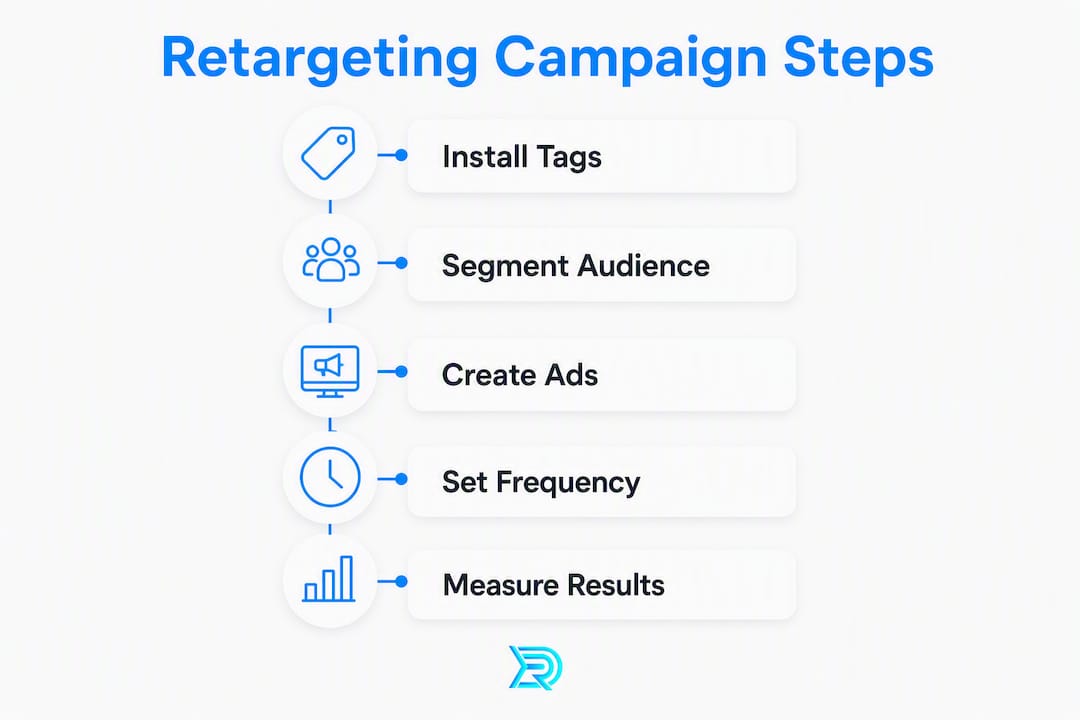
Every retargeting campaign follows the same data flow: a visitor lands on your site, a tracking pixel fires, the ad platform adds that person to an audience list, and your ads follow them across Google, Facebook, Instagram, and YouTube until they convert or the audience window expires.
Here’s the step-by-step sequence:
- Visitor lands on your site. The Meta Pixel or Google Ads remarketing tag fires and records the visit anonymously.
- User is added to an audience list. The platform groups them by the page they visited (roof leak page, siding gallery, estimate form).
- Your ads serve. The platform bids to show your ad to that person on Facebook, Instagram, Google Display, or YouTube.
- User clicks and converts. They fill out your form, call your number, or book an estimate.
- Converted users are excluded. You remove them from the retargeting audience so you stop spending on people who already booked.
The four tracking components you need:
- Meta Pixel (Facebook/Instagram): Fires on every page load; powers Facebook and Instagram retargeting audiences.
- Google Ads remarketing tag or GA4 audience: Feeds Google Display Network and YouTube retargeting.
- Conversion tracking: Tells the platform which clicks turned into form fills or calls so it can optimize bids.
- UTM parameters: Label every campaign, ad set, and ad so you can trace leads back to the exact audience in your CRM.
One thing contractors often worry about: retargeting does not give you a visitor’s name, phone number, or email. It works through anonymous platform audiences, so you’re showing ads to a cookie or device ID, not a named individual. That’s how the platforms keep it privacy-compliant when implemented correctly.
Pro Tip: Installing the Meta Pixel and Google remarketing tag typically takes about 15 minutes via Google Tag Manager. The real time investment is building your audience segments and writing the creative, not the technical install itself.
What types of retargeting ads work best for contractors?
Not every retargeting format fits every contractor use case. Here’s what each type does and where it performs:
-
Site pixel retargeting (website custom audiences): The most common type. Anyone who visits a specific page gets added to a list. A siding contractor can target everyone who viewed the “fiber cement siding” page but never hit the estimate form. Runs on Facebook/Instagram and Google Display.
-
CRM/list-based retargeting: You upload a CSV of past customer emails or phone numbers. The platform matches them to accounts and serves ads. Ideal for seasonal re-engagement, like reminding past roofing customers to schedule a gutter cleaning before fall. Works well on Meta and Google Customer Match.
-
Video and YouTube retargeting: Anyone who watched 50% or more of your before/after video on YouTube gets added to a warm audience. A roofing company can follow up those viewers with a “Get a Free Estimate” ad. YouTube tends to deliver lower CPCs for awareness, with retargeting closing the loop.
-
Dynamic retargeting: Automatically pulls images and copy from your site to build personalized ads. More common in e-commerce, but a siding contractor with a large project gallery can use dynamic creative to show the exact siding style a visitor browsed.
-
Social engagement retargeting: Targets people who engaged with your Facebook or Instagram page, watched a Reel, or clicked a post, even if they never visited your website. Useful for contractors running organic social content who want to convert warm followers into estimate requests.
Facebook and Instagram tend to deliver the lowest cost per lead for visual trades like roofing and siding, where before/after photos carry the message. Start there before expanding to Google Display or YouTube.
How should you segment audiences and set time windows?
Audience segmentation is where most contractors either win or waste money. Showing the same generic ad to someone who spent 30 seconds on your homepage and someone who spent four minutes reading your estimate page is a mistake. Matching your creative to the exact page visited is the primary factor separating good retargeting from bad.

Build these five audiences first:
| Audience Segment | Recommended Window | Intent Level | Notes |
|---|---|---|---|
| Estimate/quote page visitors | 7–14 days | High | Shorten window for emergency work (storm damage, leaks) |
| Service page visitors (roofing, siding, gutters) | 30 days | Medium | Standard replacement research timeline |
| Project gallery viewers | 30 days | Medium | Visual proof converts well; use before/after creative |
| Long-research pages (cost guides, comparison pages) | 60–90 days | Low-medium | Replacement projects have longer decision cycles |
| Past customers (CRM upload) | 180 days | Re-engagement | Seasonal reminders, referral asks, upsell services |
A few practical rules:
- Exclude short bounces. If someone spent fewer than 10 seconds on your site, they likely landed by accident. Most platforms let you exclude visitors who viewed fewer than two pages or stayed under a time threshold.
- Exclude converted customers immediately. Once someone fills out your form or calls, remove them from active retargeting audiences. Showing ads to a booked customer wastes budget and feels tone-deaf.
- Shorten windows for emergency work. A homeowner with an active roof leak makes a decision in 24–72 hours. A 7–14 day window keeps your spend focused on the window when they’re still deciding.
For off-season contractor campaigns, extend your past-customer window to 180 days and run re-engagement ads in late winter before the spring rush.
What creative and messaging actually converts contractor prospects?
The single most common retargeting mistake is running a generic “Call Us Today” ad to every audience. The message has to match where the prospect is in their decision. Think of it as a conversation: you wouldn’t pitch a hard close to someone who just started researching.
Creative-to-intent mapping:
- Research-stage visitors (service pages, cost guides): Offer a checklist, a “5 Signs You Need a New Roof” guide, or a local project case study. The goal is to build trust, not push a booking.
- Quote-stage visitors (estimate page, contact page): Lead with social proof. A five-star review callout, a “Trusted by 200+ homeowners in [City]” headline, or a limited-availability message (“We have 3 estimate slots open this week”) works well here.
- Past customers (CRM list): Seasonal service reminders. “Your gutters are due for a fall clean-out” or “Storm season is coming, schedule your roof inspection” keeps you top of mind for repeat work and referrals.
Three short ad text examples:
- Estimate page abandoner: “Still thinking it over? We have 3 estimate slots left this week. [Your City]’s top-rated roofer. Book in 60 seconds.”
- Gallery viewer (siding): “Saw something you liked? That’s our James Hardie work in [Neighborhood]. Get a free siding quote this week.”
- Service-page researcher: “Not sure if you need a repair or a full replacement? Download our free roof inspection checklist and know before you call.”
Creative best practices:
- Use square (1:1) images for Facebook/Instagram feed and 1200×628 for Google Display.
- Keep headlines under 40 characters so they don’t truncate on mobile.
- Social creative needs bold visuals (before/after photos, job-site shots); Google Display needs a clear logo and a single benefit statement.
- Rotate creative every 2–4 weeks. Engagement peaks at roughly 5–7 impressions per user per month, and performance drops sharply after 15–20 monthly impressions as ad fatigue sets in.
Pro Tip: For remodel-focused retargeting, check the residential remodel Facebook Ads guide for platform-specific creative specs and audience examples that translate directly to siding and general contractor campaigns.
What’s the minimum tech stack you need to run retargeting?
You don’t need an enterprise marketing stack to run effective contractor ad retargeting. Here’s the minimum viable setup:
- Meta Pixel: Installed via Google Tag Manager or directly in your website’s header. Powers all Facebook and Instagram retargeting audiences. Without it, you have no social retargeting.
- Google Ads remarketing tag or GA4 audience: Feeds Google Display Network and YouTube campaigns. GA4 is the preferred setup for new accounts since it also handles cross-device tracking.
- Conversion tracking: Set up in both Google Ads and Meta Events Manager. Tag your “Thank You” page (after a form fill) and your phone number click as conversion events. Without this, you’re flying blind on which ads actually generate leads.
- Focused retargeting landing page: Don’t send retargeting clicks to your homepage. Build a page specific to the audience (estimate page for quote abandoners, gallery page for visual browsers) with one clear call to action.
- Basic CRM or lead capture system: Even a simple setup like a Google Sheet fed by a form tool works for list-based retargeting. The goal is capturing lead source data so you can build exclusion lists and upload past-customer lists.
Retargeting works as a privacy-compliant system when you use platform-native audiences rather than collecting personal data yourself. Pass UTM labels from every ad into your CRM so you can tie a booked job back to the retargeting campaign that drove it.
How much does contractor retargeting cost and how should you budget?
Retargeting is typically the most cost-efficient slice of your ad spend because you’re targeting warm traffic, not cold audiences. A reasonable starting allocation is a portion of your total monthly ad budget dedicated to retargeting, with the remainder going to prospecting campaigns that feed new visitors into your funnel.
Typical retargeting CPCs for contractors range from roughly $0.25 to $1.23 depending on platform; Google Display tends toward $0.66–$1.23 while social can be lower.
| Traffic Level | Monthly Site Visitors | Suggested Monthly Retargeting Budget | Daily Spend | Frequency Target |
|---|---|---|---|---|
| Low | low traffic level with corresponding smaller monthly and daily budgets and lower frequency targets | |||
| Mid | mid traffic level with correspondingly moderate monthly and daily budgets and frequency targets | |||
| Established | higher traffic level with larger monthly and daily budgets and higher frequency targets |
A few bidding notes:
- CPC bidding works well when your audience is small and you want to control spend tightly. Start here.
- CPM bidding makes sense once your audience exceeds 1,000 users and you want to maximize impressions for brand recall.
- Use automated bidding (Target CPA) only after you have at least 30–50 conversion events recorded. Before that, the algorithm lacks enough data to optimize effectively.
Retargeting can recapture up to 26% of visitors who left without converting when audiences and creative are well-configured. For a contractor averaging a $5,000 job, even a handful of recovered leads per month makes the budget math straightforward.
For targeted local ad strategies that pair retargeting with prospecting, the budget split becomes even more important to get right.
How do you measure retargeting campaign performance?
Tracking the right metrics keeps you from confusing activity with results. Here’s what to watch:
Primary KPIs (tied to business outcomes):
- Cost per lead (CPL): Total retargeting spend divided by form fills and tracked calls. This is your north star.
- Cost per booked job: CPL multiplied by your lead-to-close rate. Your cost per lead multiplied by your lead-to-close rate gives your cost per booked job.
- Conversion rate from retargeting clicks: What percentage of retargeting clicks turn into a form fill or call? A well-segmented campaign should outperform your cold traffic conversion rate.
- Frequency: Average impressions per user per month. Keep this between 5–15. Above 20, you’re burning budget on fatigued audiences.
Secondary and diagnostic metrics:
- CTR (click-through rate): Low CTR on a warm audience signals a creative or message mismatch.
- Landing-page bounce rate: If retargeting clicks bounce at 80%+, your landing page isn’t matching the ad’s promise.
- Time on site after click: Retargeting visitors should spend more time on site than cold traffic. If they don’t, revisit your audience segmentation.
- View-through conversions: Conversions that happened within a set window after someone saw (but didn’t click) your ad. Useful for brand recall measurement, but weight these less heavily than click-through conversions.
Reporting cadence:
- Weekly: Check spend, CPL, frequency, and CTR. Flag any audience with frequency above 15 or CTR below 0.5%.
- 30-day review: Compare retargeting CPL to prospecting CPL. Retargeting should cost less per lead.
- 60/90-day deep dive: Pull booked jobs from your CRM and match them to lead source. This is the only way to know your true cost per booked job from retargeting.
What mistakes do contractors make with retargeting, and how do you fix them?
Most underperforming contractor retargeting campaigns share the same handful of problems.
Mistake 1: One generic ad for every audience.
Showing a “Free Estimate” banner to someone who just read your cost guide and someone who abandoned your estimate form is a wasted impression on the first person. Fix it by building separate ad sets for each audience segment and writing copy that matches where they are in the decision. Measure improvement by watching CTR per audience segment; a segmented campaign typically shows 2–3x higher CTR on high-intent audiences versus a blanket campaign.

Mistake 2: No exclusions for converted customers.
Running ads to people who already booked wastes budget and annoys your best customers. Fix it by creating a “Converted” audience (anyone who hit your Thank You page) and excluding it from every active campaign. Check your exclusion list weekly during busy seasons.
Mistake 3: Ad fatigue from high frequency.
When a user sees your ad 25 times in a month, they stop seeing it entirely, and your CTR collapses. Cap frequency at 15–20 impressions per month and rotate creative every 2–4 weeks. If you notice CTR dropping week over week with no change in audience size, fatigue is usually the cause.
Mistake 4: Sending retargeting clicks to the homepage.
A homepage is a general destination. A retargeting click from someone who viewed your siding gallery should land on a siding-specific page with one call to action, not a page that asks them to choose between five services. Fix it by building dedicated landing pages for each audience segment. Bounce rate is your diagnostic: a well-matched landing page should see bounce rates below 50% from retargeting traffic.
Mistake 5: Audiences that are too small to spend efficiently.
If your audience has fewer than 200 users, most platforms won’t serve your ads reliably. Fix it by broadening the time window (from 7 days to 30 days) or combining similar pages into one audience until you hit at least 500 users. Check audience size in Meta Ads Manager or Google Ads before launching.
Two brief case examples:
A roofing contractor in the Southeast was running one retargeting ad to all site visitors. CTR was 0.3% and CPL was $180. After splitting into three audience segments (estimate page, service pages, homepage) with matched creative, CTR on the estimate-page audience jumped to 1.8% and CPL dropped to $65 within 30 days.
A siding company was burning $400/month on retargeting with zero booked jobs to show for it. The problem: no exclusion list and a frequency of 28 impressions per user per month. After adding a converted-customer exclusion and capping frequency at 12, the same budget produced four booked estimates in the following month.
Your 7-step checklist to launch a contractor retargeting campaign
Follow this sequence and you’ll have a live test within a week.
-
Install tracking pixels (Day 1, 15 minutes). Add the Meta Pixel and Google Ads remarketing tag via Google Tag Manager. Verify both fire correctly using Meta Pixel Helper and Google Tag Assistant.
-
Set up conversion tracking (Day 1–2, 30 minutes). Tag your Thank You page and phone number click as conversion events in both Meta Events Manager and Google Ads. No conversion tracking means no optimization data.
-
Build three core audiences (Day 2–3). Create: all site visitors (30 days), estimate/contact page visitors (14 days), and a past-customer list from your CRM (upload as a custom audience). Exclude anyone who hit your Thank You page.
-
Create three ad creatives (Day 3–4). One per audience: a social-proof ad for estimate abandoners, a before/after visual for gallery viewers, and a checklist offer for service-page researchers. Follow the image specs and headline limits from the creative section above.
-
Set budgets and frequency caps (Day 4). Start at $10–$20/day total across all audiences. Set frequency caps at 15 impressions per user per month. Assign budget proportionally: more to high-intent audiences (estimate page) and less to broad site visitors.
-
Launch and monitor the first week (Day 5–7). Go live. Check daily for the first three days: confirm ads are serving, audiences are building, and no anomalous spend. Don’t optimize yet; let the data accumulate.
-
First analysis at 7 days. Review CTR per audience, frequency, and any early conversions. At 4 weeks, compare CPL across audiences and pause underperformers. At 8 weeks, pull booked jobs from your CRM and calculate cost per booked job.
Who owns each step: If you’re running this yourself, the pixel install and conversion tracking are the highest-risk steps. Get those right first. If you’re handing this to an agency, confirm they set up conversion tracking before they touch the ad creative. An agency that skips conversion tracking is flying blind on your budget.
Key Takeaways
A well-segmented contractor retargeting strategy, with matched creative, frequency caps, and conversion tracking, consistently delivers lower cost per lead than cold prospecting campaigns.
| Point | Details |
|---|---|
| Segment by page intent | Build separate audiences for estimate-page visitors, service-page visitors, and past customers, then match creative to each. |
| Cap frequency at 15–20 impressions | Engagement peaks at roughly 5–7 impressions per user per month; beyond 20, CTR drops and budget is wasted. |
| Use time windows that match buying cycles | Emergency repairs need 7–14 day windows; replacement projects need 60–90 days to match longer decision timelines. |
| Track to booked jobs, not just clicks | Set up conversion tracking from day one and tie retargeting spend to booked revenue at your 60/90-day review. |
| Resultsdigitalus for done-for-you setup | Resultsdigitalus manages pixel install, audience segmentation, creative, and reporting for contractors who want agency-grade retargeting without building it themselves. |
Why generic retargeting templates fail contractors
Most retargeting advice online is written for e-commerce brands selling $50 products. The buying cycle is short, the decision is low-stakes, and a single discount code can close the sale. Contractor work is the opposite: a $12,000 roof replacement involves multiple decision-makers, a 30–90 day research window, and a trust threshold that a generic “Call Now” banner will never clear.
The contractors who see real results from retargeting treat it as a sequenced conversation, not a broadcast. They show a checklist to someone who just started researching. They show a five-star review to someone who visited the estimate page twice. They show a seasonal reminder to a past customer in October. Each message earns the next click rather than demanding it.
There’s also a geography problem that generic templates ignore entirely. A roofing contractor in Houston competes in a market with different seasonality, storm patterns, and average job values than one in Minneapolis. The audience windows, the creative angles, and even the platforms that perform best shift by market. A template built for a national brand won’t account for that, and neither will a generalist agency running the same playbook they use for a dental practice.
The contractors who hand retargeting to a specialist, rather than a generalist, tend to close the gap between “we ran ads” and “we booked jobs” faster. Not because the tactics are secret, but because the creative proof, the audience windows, and the landing pages are built around trade-specific buying behavior from day one.
Resultsdigitalus runs contractor retargeting so you can focus on the job
Resultsdigitalus is a veteran-owned agency built exclusively for roofing, siding, gutter, and general contractors across the United States. Every retargeting program we manage includes pixel installation, audience segmentation, ad creative tailored to your trade, frequency capping, exclusion list management, conversion tracking, and monthly reporting tied to booked jobs, not just clicks.
We work with one contractor per trade per market, so your campaign never competes with another client’s budget or creative. No long-term contracts. We’ve helped contractors scale from a handful of crews to operations worth tens of millions, and we apply that same contractor-specific approach to every retargeting campaign we run.
If you’re ready to stop losing the 96% of visitors who leave without booking, get started with contractor digital marketing or explore our Google Ads management for contractors to see how retargeting fits your full lead generation strategy.
Useful sources
- What Is Retargeting? How It Works and Why It Matters (Criteo) — Clear platform-level explanation of how retargeting audiences are built and served; useful for understanding the mechanics behind pixel-based campaigns.
- A Definitive Guide to Impactful Retargeting (Adjust) — Covers audience strategy, frequency management, and measurement frameworks in depth; good reference for setting up attribution.
- What Is Ad Retargeting? (Mailchimp) — Plain-language overview of retargeting formats and platform options; useful starting point for contractors new to the tactic.
