
The single biggest driver of visibility for a service-area business (SAB) is a coordinated territory signal: a properly configured Google Business Profile, unique Service Area Pages on your website, and a localized reputation program working together. Without all three, you are competing with one hand tied behind your back. Here is where to start:
- Claim and configure your GBP service area (hide your address, add your top cities and ZIP codes, select the right primary category)
- Publish at least three high-quality Service Area Pages targeting your highest-revenue markets
- Launch a review collection process that prompts customers to mention the neighborhood or city where you worked
Assign each item to a team member or agency this week. The rest of this guide shows you exactly how to execute each one.
Key Takeaways
Service area business SEO requires three coordinated signals working together: a correctly configured GBP, unique Service Area Pages for each target market, and a localized review program that names the neighborhoods where you work.
| Point | Details |
|---|---|
| GBP configuration is foundational | Hide your address, tighten service areas to realistic coverage, and select the most specific primary category. |
| SAPs must have unique local proof | Each city page needs real job photos, local testimonials, and a local FAQ — not just a swapped city name. |
| Reviews carry location signals | Prompt customers to mention their neighborhood; embed those reviews on the matching SAP with Review schema. |
| Track at ZIP-code level | Use BrightLocal Local Search Grid and SEMrush to monitor local pack rankings by ZIP, not just overall domain traffic. |
| Resultsdigitalus builds this system for contractors | The agency handles GBP, SAPs, and reputation programs exclusively for roofing, gutter, siding, and general contractors across the United States. |
Table of Contents
- How does Google Business Profile work for service-area businesses?
- How to set up and manage your GBP service area
- What should you optimize in your GBP to get more leads?
- How do you build Service Area Pages that actually rank?
- How do reviews support your service-area visibility?
- How do you track SAB visibility across your whole territory?
- What are the most common SAB SEO mistakes to avoid?
- Why does specialist contractor SEO outperform generic local SEO?
- The territory-dominance mindset most SABs are missing
- Resultsdigitalus builds territory-dominant SEO for contractors
- Sources
How does Google Business Profile work for service-area businesses?
Google treats SABs differently from storefront businesses. When you manage your service areas in GBP, Google hides your physical address and replaces the map pin with a shaded service-area boundary or a list of cities and ZIP codes. Searchers see your coverage zone, not your home address.
That distinction matters operationally. A storefront business gets a pin on Google Maps, which gives it a strong proximity signal for anyone searching nearby. An SAB without a visible pin has to compensate through prominence and relevance: the quality of your GBP profile, the strength of your Service Area Pages, and the volume and recency of your reviews.
GBP shows a service-area shape for SABs and recommends limiting coverage to realistic travel bounds. SAPs and reputation work compensate for the lack of a storefront pin. — BrightLocal
Overly broad service areas dilute your local relevance. If you cover a 150-mile radius but only realistically work within 45 miles, Google reads that as a weak signal for every city in the zone. Tighter, realistic coverage paired with strong content and reviews for those specific markets outperforms a sprawling service area every time. A territory-first local SEO strategy treats GBP configuration, localized pages, and reputation as a single system rather than three separate tasks.
How to set up and manage your GBP service area
Follow these steps whether you are building from scratch or auditing an existing profile:
- Sign in to your Google Business Profile at business.google.com and select your business.
- Choose your business type. Under “Business information,” select “Service-area business” if you travel to customers and do not serve them at your address.
- Hide your address. Toggle off the public address display. Per Google’s official guidance, businesses that do not serve customers at their location should not show that address publicly. Exposing a residential address as a storefront risks suspension.
- Add your service areas. Enter cities, counties, or ZIP codes. GBP allows up to 20 service-area entries. Prioritize the markets that drive the most revenue and stay within realistic travel bounds of your base of operations.
- Select your primary and secondary categories. Your primary category is the single most important ranking signal in GBP. Be specific: “Roofing Contractor” outperforms “Contractor” for roofing searches.
- Complete your contact info and website URL. Link directly to your homepage or, if you have one, a dedicated landing page for your primary service area.
- Verify your listing. Google offers video verification, phone, or postcard methods for SABs. Complete verification before making further optimizations.
Common setup pitfalls to avoid:
- Do not create multiple GBP listings for the same business using virtual offices or PO boxes. Google’s guidelines prohibit this, and it is a fast path to suspension.
- Do not list duplicate profiles for the same trade in the same market. If you find one, request removal through the GBP dashboard.
- Inconsistent NAP (name, address, phone) across directories undermines your citation signals. Pick one canonical format and use it everywhere.
Pro Tip: When choosing which cities and ZIP codes to enter, pull your last 12 months of job data and rank markets by revenue. Start with your top five. You can always expand later, but a tight, well-supported coverage zone ranks faster than a broad, thin one.
What should you optimize in your GBP to get more leads?
A complete, active GBP profile drives materially higher customer engagement. Ongoing optimization — not a one-time setup — is what sustains ranking signals over time. Work through this checklist:
Profile completeness:
- Primary category (most specific match to your core service)
- Up to 9 secondary categories for related services
- Business description (750 characters; include your top service and two or three cities you serve)
- Full service list with descriptions and prices where applicable
- Accurate hours, phone number, and booking link
Visual assets:
- Job photos showing completed work (before/after roofs, installed gutters, finished siding)
- Truck or crew photos with your branding visible
- At least one new photo per week; captions should name the neighborhood or city (“New roof installation in Katy, TX”)
Posts and Q&A:
- Publish a GBP post at least twice per month. Seasonal offers, completed projects, and local tips all perform well.
- Seed your Q&A section with the three questions customers ask most often, then answer them yourself.
Local Services Ads (LSA) and Google Guaranteed:
LSAs appear above standard paid search results and carry a Google Guaranteed badge, which signals trust to homeowners. For SABs in trades like roofing, gutters, and siding, LSAs can generate calls at a lower cost per lead than traditional Google Ads, especially in competitive markets. They also feed reputation data back into your GBP prominence signals.
Pro Tip: Photo captions are indexed by Google. Always include the city or neighborhood in the caption text (“Gutter replacement, Sugar Land, TX”) to reinforce your service-area signals without any extra technical work.
How do you build Service Area Pages that actually rank?
Service Area Pages (SAPs) are localized landing pages on your website, each targeting a specific city or ZIP code you serve. They let businesses without storefronts rank for “[service] + [city]” queries and compete directly against storefront competitors in local organic results.
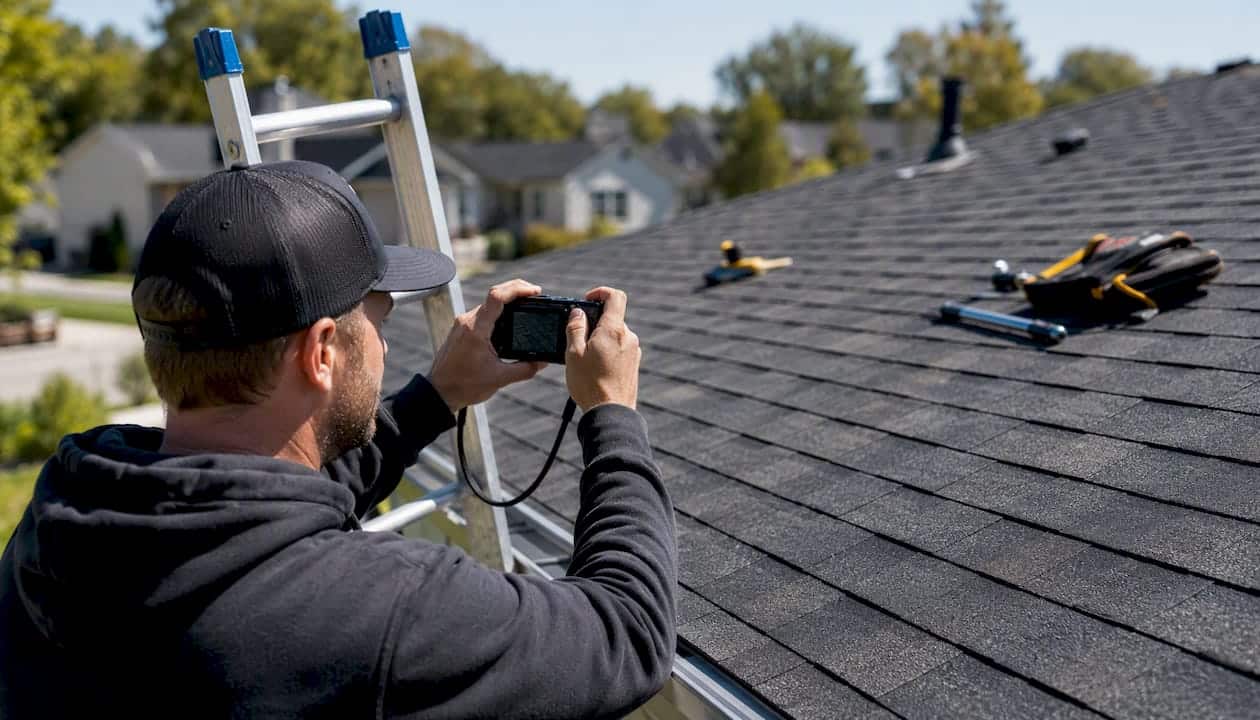
The risk is thin content. Google’s doorway-page policy penalizes pages that exist only to funnel traffic with no unique value. The fix is local proof: every SAP must contain content that could only exist for that specific market.
Anatomy of a high-performing SAP
- H1: “[Service] in [City, State]” (e.g., “Roof Replacement in Plano, TX”)
- Local intro paragraph: Two to three sentences about why homeowners in that city need your service (local weather patterns, common roof types, HOA considerations)
- Services offered in that area: A brief list of what you do there, not a copy-paste of your homepage services
- Neighborhood proof: Photos taken at actual job sites in that city, with captions naming the neighborhood
- Local testimonials: Reviews from customers in that city, marked up with Review schema
- Local FAQs: Two or three questions specific to that market (permit requirements, common storm damage types)
- Clear CTA: Phone number with tap-to-call, a contact form, and your service area stated explicitly
BrightLocal’s SAP guidance is direct: unique local content, real photos, and genuine testimonials are non-negotiable. Templated pages where only the city name changes will not rank and may be filtered out of results entirely.
Technical signals: schema markup
Add LocalBusiness schema with areaServed to every SAP. Use the areaServed property to list the city or ZIP code the page targets. For precise territory coverage, a GeoShape polygon can define your service boundary more accurately than a city name alone. Mark up localized reviews with Review schema to make them eligible for rich results.
Content checklist for each SAP:
- Unique local intro (not copied from another SAP)
- At least two job photos taken in that city
- At least one local customer testimonial
- Local FAQ section (two or three questions)
- LocalBusiness schema with
areaServed - Internal links to your main service pages and back to the SAP from your GBP website URL
Where to start: Build SAPs for your top revenue ZIP codes or cities first. Link each SAP from your GBP profile’s website field and from your site’s main navigation or an HTML sitemap so Google can crawl them. For more on SAP structure specific to roofing and exterior trades, see what contractors must know about service area pages.
Pro Tip: Mobile users searching for contractors want to call immediately. Make sure every SAP has a tap-to-call button above the fold. A page that loads fast and converts on mobile is worth more than a perfectly optimized page that buries the phone number. Check your contractor website conversion rate if calls are low despite good rankings.
How do reviews support your service-area visibility?
Reviews do two jobs for an SAB: they build trust with homeowners, and they carry location signals that reinforce your territory coverage. When a customer mentions “great job on my roof in Cypress” in a review, that city name becomes part of your GBP’s relevance signal for Cypress searches.
How to collect location-specific reviews:
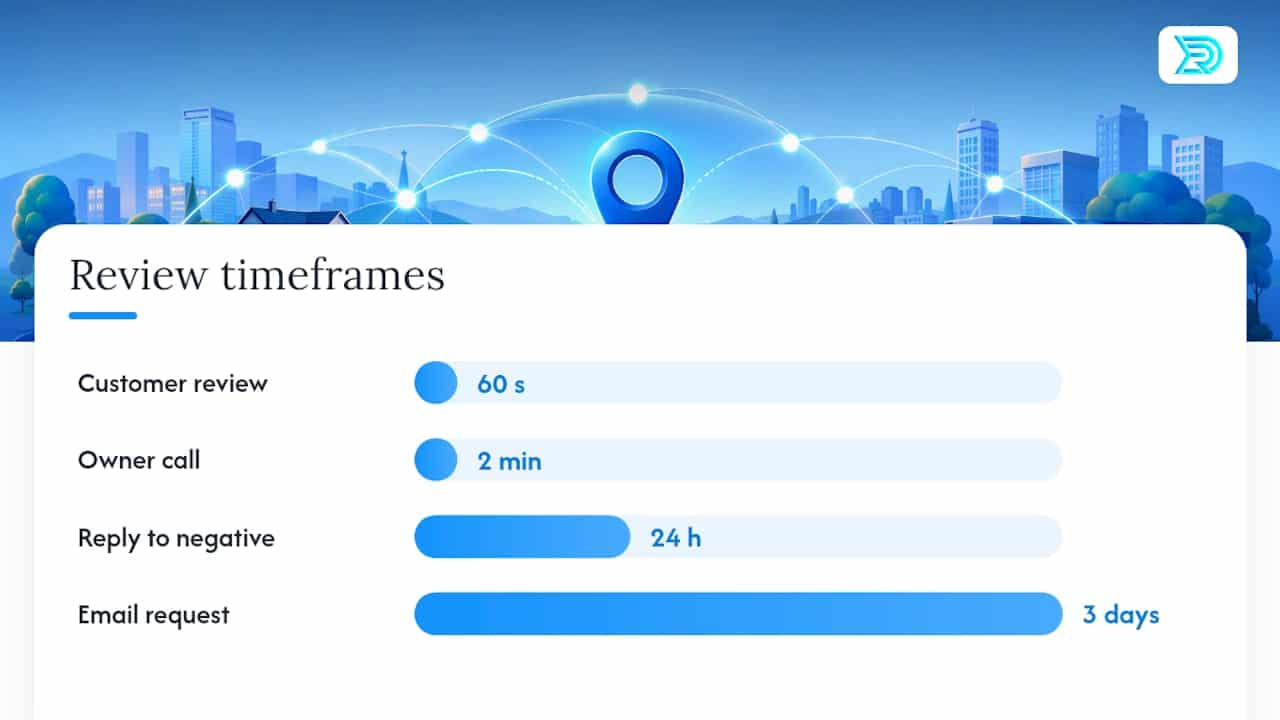
- Ask immediately after job completion, while the experience is fresh. A text message with a direct link to your GBP review page converts far better than an email sent three days later.
- Give customers a simple prompt: “If you have a minute, we’d love a review. Feel free to mention the neighborhood or city where we worked.”
- For higher-ticket jobs, a personal phone call from the owner or project manager asking for feedback and a review is worth the two minutes.
Review request script (SMS):
“Hi [Name], thanks for choosing [Company]. We’d love to hear how the job went. If you have 60 seconds, a Google review helps us a lot: [link]. Feel free to mention your neighborhood!”
Embed reviews on your SAPs using a widget or static markup, and add Review schema so Google can read the structured data. A page with three embedded local reviews outperforms an identical page with none, all else being equal.
Do not buy reviews or offer incentives for positive reviews. Google’s policies prohibit it, and the risk of suspension or review removal is not worth the short-term gain. Respond to every negative review within 24 hours: acknowledge the issue, offer to resolve it offline, and keep the tone professional. For a full playbook on contractor reputation management, the roofing contractor reputation guide covers response frameworks in detail.
Pro Tip: Set up a review request trigger in your CRM or invoicing software so the SMS fires automatically when a job is marked complete. Manual follow-up gets skipped; automated follow-up does not.
How do you track SAB visibility across your whole territory?
Flying blind on local rankings is one of the most common mistakes SABs make. You need to know which ZIP codes you are winning and which ones need work. A single Google Analytics session count tells you almost nothing about territory performance.
Essential KPIs to track:
- Local impressions by city and ZIP (GBP Insights)
- Calls from GBP (tracked in GBP Insights and call tracking software)
- Direction requests (a strong signal of purchase intent)
- Form submissions and conversion rate by SAP
- Booked jobs and average job value by market
| Metric | Where to find it | Action if it drops |
|---|---|---|
| Local impressions by city | GBP Insights / BrightLocal Local Search Grid | Audit SAP content; add local proof and photos |
| Calls from GBP | GBP Insights / call tracking | Check GBP completeness; review post cadence |
| Direction requests | GBP Insights | Verify service area settings; check for duplicate listings |
| SAP conversion rate | Google Analytics 4 (goal completions) | Improve CTA placement; add tap-to-call above fold |
| Local pack rank by ZIP | BrightLocal Local Search Grid / SEMrush | Build local citations; add reviews for that market |
BrightLocal’s Local Search Grid visualizes your GBP ranking across a geographic grid, showing exactly where you rank at the ZIP-code level. SEMrush’s listing management and position tracking tools let you monitor local pack rankings and citation consistency across directories. Use both: BrightLocal for the grid view, SEMrush for citation audits and keyword-level tracking.
Set a monthly reporting cadence at minimum. Review GBP Insights weekly for call volume and impression trends. If impressions drop in a specific ZIP, that is your signal to audit the SAP for that market and check whether any new reviews have come in. Scalable local SEO programs track at ZIP and city granularity, not just at the domain level.
What are the most common SAB SEO mistakes to avoid?
Most SABs lose ground not because they did something wrong once, but because they made a handful of structural mistakes early and never corrected them. Here are the ones that cost the most:
Top mistakes:
- Overbroad service area in GBP. Listing 40 cities when you realistically serve 10 dilutes every signal. Tighten the list.
- Doorway pages. Publishing 30 city pages where only the city name changes is a penalty waiting to happen. Every page needs unique local proof.
- Virtual offices for extra GBPs. Creating additional GBP listings at coworking spaces or mail-forwarding addresses violates Google’s guidelines and risks suspension of your primary listing.
- Inconsistent NAP. Your business name, address (even if hidden), and phone number must match exactly across every directory: Google, Yelp, Angi, HomeAdvisor, and your own website.
- Weak local proof on SAPs. Stock photos and generic copy do not signal local relevance. Real job photos and real customer names from that city do.
Operational checklist with timeline:
Immediate (0–7 days):
- Audit your GBP: hide address, tighten service area to realistic coverage, verify primary category
- Check for duplicate GBP listings and request removal of any found
- Confirm NAP consistency across your top five directories
Short term (1–3 months):
- Build or rebuild SAPs for your top revenue markets with unique local content
- Launch an automated review request workflow tied to job completion
- Add LocalBusiness schema with
areaServedto every SAP, where possible - Set up BrightLocal or SEMrush for ZIP-level rank tracking
Ongoing:
- Publish regular GBP posts with job photos and city mentions
- Add new photos regularly to GBP
- Request reviews after completed jobs
- Review GBP Insights weekly; run a full territory rank report monthly
Indicative cost notes (estimates only): DIY execution of the above takes roughly 8–15 hours upfront and 2–4 hours per month to maintain. Agency retainers for contractor-focused local SEO vary depending on the number of service areas and the competitive intensity of the markets. These are ballpark figures; actual costs vary by scope and provider. For a broader view of what field-service businesses need operationally, the service business equipment and operations checklist covers readiness factors beyond marketing.
Why does specialist contractor SEO outperform generic local SEO?
Google’s E-E-A-T framework (Experience, Expertise, Authoritativeness, Trustworthiness) rewards businesses that demonstrate genuine, verifiable expertise in their trade. For a roofing contractor, that means proof-of-work photos on SAPs, licensing and insurance details, project-specific content, and reviews that reference real job types and locations. Generic local SEO templates skip all of that.
The practical difference shows up in results. Consider a mid-sized roofing contractor who came in with a GBP that had no photos, no service area configured, and a website with a single homepage. After a structured program covering GBP configuration, five SAPs with local job photos and reviews, and a post-job review workflow, the business saw a significant lift in inbound calls from Google within 90 days. The gains were concentrated in the ZIP codes where SAPs were published and where reviews mentioned specific neighborhoods.
When should you DIY versus hire a specialist?
- DIY makes sense if you serve two or three markets, have time to write genuine local content, and can commit to a monthly maintenance routine.
- Hire a specialist when you serve five or more markets, your revenue per job exceeds $5,000, or you are expanding into new territory and need results faster than organic momentum allows.
A specialist with contractor-specific experience brings pre-built SAP frameworks, category and keyword research calibrated to trades, and a review workflow that integrates with your existing job management software. For a detailed breakdown of what contractor-focused SEO services include, see SEO services for general contractors.
The territory-dominance mindset most SABs are missing
Most local SEO advice treats GBP, your website, and reviews as three separate checklists. That framing is where contractors lose. The businesses that consistently dominate local search in competitive markets treat all three as one operating system. When your GBP service area, your SAPs, and your reviews all point to the same cities and neighborhoods, Google gets a clear, corroborated signal that you are the relevant, active, trusted provider in that territory.
The conventional advice to “just get more reviews” or “add your city to your homepage” is not wrong, but it is incomplete. A contractor with 200 reviews and no SAPs will lose to a competitor with 50 reviews, three well-built city pages, and a fully configured GBP. The page-level local signal is that powerful.
What most owners underestimate is the compounding effect. A new SAP published today may not rank for 60 days. But a SAP published today, linked from your GBP, with two local photos and one local review embedded, starts building authority immediately. Add a second SAP next month and a third the month after, and by month four you have a territory footprint that is genuinely hard for a competitor to displace quickly.
The single metric to watch first is inbound calls from Google. Not impressions, not clicks. Calls. That number tells you whether your territory signals are converting to real business. If calls are flat despite rising impressions, the problem is your SAP conversion rate, not your rankings.
Resultsdigitalus builds territory-dominant SEO for contractors
Resultsdigitalus is a veteran-owned agency built exclusively for roofing contractors, gutter companies, siding companies, and general contractors across the United States. Every strategy, every SAP, every GBP workflow is built for contractor lead generation, not adapted from a generic marketing template.
The agency’s exclusivity model means only one company per trade per market gets the full program. No long-term contracts. Results Digital helped a Florida roofing company scale from 3 crews to 18 before selling for $60 million. That kind of growth starts with owning local territory, ZIP code by ZIP code.
If you are ready to stop flying blind and start tracking calls by market, see what contractor SEO looks like in practice or get the full digital marketing picture and find out whether your market is still available.
Sources
- Manage your service areas for service-area & hybrid businesses
- Local SEO for Service-area Businesses – BrightLocal
- Service Area Pages: Boost Local SEO Across Locations
- Service Area SEO explained
- Local SEO: The Complete Guide
- What is local SEO? (Semrush blog)
