
For most local service businesses fielding phone calls and booked jobs, Google Local Services Ads (LSA) should be your first dollar spent. The pay-per-lead model means you only pay when a potential customer contacts you directly, and the top-of-page placement with a Google Guaranteed or Google Screened badge builds trust before a prospect even dials your number. That said, if your trade isn’t LSA-eligible, you need remarketing, or you’re scaling across multiple markets, Google Ads is the more powerful channel.
The two core trade-offs come down to this:
- LSA: Pay per lead, limited creative control, strong local intent, verification required, simpler to launch for eligible trades.
- Google Ads: Pay per click, full targeting and creative control, broader reach, higher optimization demand, no eligibility restrictions.
Pro Tip: In week one, check whether your trade and zip code are eligible for LSA at Google’s LSA setup page before building any campaign. If you’re eligible, launch LSA first and run Google Ads in parallel after 30 days so you have a real cost-per-lead (CPL) baseline to compare.
Table of Contents
- How do LSA and Google Ads compare side by side?
- What are Local Services Ads and how do they work?
- How do Google Ads work for local contractors?
- What are the real pros and cons of each platform?
- How do you decide between LSA, Google Ads, or both?
- How do you run LSA and Google Ads together without flying blind?
- Quick setup checklists for LSA and Google Ads
- Results Digital case study: contractor lead performance
- Key Takeaways
- What Results Digital sees work most often (and the mistakes to avoid)
- How Resultsdigitalus helps contractors run both channels profitably
- Useful sources and official documentation
How do LSA and Google Ads compare side by side?
The table below maps the eight decision dimensions that matter most to a contractor or local service operator choosing between these two platforms.
| Dimension | Google Local Services Ads (LSA) | Google Ads (Search/Display) |
|---|---|---|
| Cost model | Pay-per-lead (PPL) | Pay-per-click (PPC) |
| Lead intent & quality | High local intent; caller actively seeking your service | Variable; depends on keyword match type and landing page |
| Placement on Search/Maps | Above paid search ads, top of Google Search results | Search, Display, YouTube, Gmail, Maps placements |
| Eligibility & verification | Background checks, license/insurance, Google Business Profile required | No verification; open to all industries and formats |
| Best-for use cases | Phone/booked-job leads, eligible trades, limited budgets | Non-eligible industries, multi-service, remarketing, scale |
| Setup complexity/time-to-live | Moderate (verification adds 1–2 weeks); simpler ongoing management | Higher upfront; live within days but requires active optimization |
| Measurement & attribution | CPL tracked in LSA dashboard; CRM match-back needed for conversion | Full conversion tracking, UTMs, call tracking, CPA reporting |
| Scalability & control | Limited audience targeting; Google controls ad format | Full bidding, audience, creative, and funnel control |
LSA wins when: your trade is eligible, your team answers the phone fast, and you want the lowest-friction path to booked jobs with a trust badge attached.
Google Ads wins when: you need to reach prospects earlier in the buying cycle, run multiple service lines, or operate in markets where LSA coverage is thin.
One caution worth repeating: never judge either platform on raw CPL alone. A $15 LSA lead that converts to a booked job beats a $9 Google Ads click that bounces. Track lead-to-customer conversion rate in your CRM, and let that number drive budget decisions.
What are Local Services Ads and how do they work?
Local Services Ads sit at the very top of Google Search results for local intent queries like “roofer near me” or “gutter installation Houston.” When someone taps your listing, they call you, send a message, or request a booking directly through the ad. You pay only when that contact happens, not for impressions or clicks that go nowhere.
The Google Guaranteed and Google Screened badges
The badge is the reason LSA outperforms standard search ads on trust. To earn it, your business must pass Google’s verification process, which includes:
Home services businesses (roofing, HVAC, plumbing, electrical, siding, gutters, general contracting) typically earn the Google Guaranteed badge. Professional services like lawyers and financial advisors earn Google Screened, which skips the insurance requirement but still requires license verification. The badge tells a homeowner that Google has vetted your business, which meaningfully increases the likelihood that they contact you over an unverified competitor.
How leads arrive and what to do with them
Leads come in three formats: phone calls, messages, and booking requests. Google’s LSA dashboard logs every contact. When a lead is clearly invalid (a wrong number, a spam call, or a request for a service you don’t offer), you can dispute it through Google’s lead dispute process for a credit. Disputes require documentation, so log every lead in your CRM the moment it arrives.
Review volume directly affects your LSA ranking. Google’s algorithm weights the number and recency of your Google reviews when deciding which businesses appear at the top of the LSA pack. A contractor with 80 reviews at 4.8 stars will consistently outrank a competitor with 12 reviews, even if the competitor bids higher.
Pro Tip: Ask every closed job for a Google review within 24 hours of completion. A simple text message with your Google Business Profile review link takes 10 seconds to send and compounds into a significant ranking advantage over 90 days.
LSA eligibility: is your trade covered?
LSA availability in the United States covers a broad but defined list of categories: roofing, gutters, siding, HVAC, plumbing, electrical, landscaping, pest control, locksmiths, and several others. General contractors are eligible in most U.S. markets. Geographic availability varies by city and zip code, so confirm your specific market before investing time in the verification process.
How do Google Ads work for local contractors?
Google Ads operates on a pay-per-click model. You bid on keywords, write ad copy, and send traffic to a landing page. Every click costs money whether or not the visitor calls you. That distinction is the single most important thing to understand before you run your first campaign.
For a roofing or siding contractor, the most relevant format is Search campaigns targeting high-intent keywords like “roof replacement cost” or “siding contractor near me.” These ads appear below LSA listings on the search results page, which means Google Ads occupies the second tier of visibility for local searches. That’s not a dealbreaker; it’s just the reality of the current SERP layout.
Beyond Search, Google Ads gives you access to Display (banner ads across Google’s partner sites), YouTube pre-roll, Gmail ads, and Maps placements. For most local contractors, Search is where 80–90% of the budget belongs, with Display and YouTube reserved for remarketing to people who visited your site but didn’t call.
What makes Google Ads more demanding
The benefits of Google Ads for contractors are real, but they come with a management tax. You need to:
- Research and build a keyword list segmented by match type (exact, phrase, broad match modifier)
- Write and test multiple ad variations
- Build a landing page that matches the ad’s promise
- Set up conversion tracking before you spend a dollar
- Add negative keywords weekly to block irrelevant searches
- Monitor Quality Score and adjust bids to stay competitive
Without active management, a Google Ads account for a contractor can burn through budget on irrelevant clicks fast. A campaign targeting “roofing” with no negative keywords will show ads for “roofing nail guns,” “roofing DIY tutorials,” and “roofing jobs hiring.” That’s money gone. The flip side: when managed correctly, Google Ads gives you targeting precision and scaling levers that LSA simply doesn’t offer.
What are the real pros and cons of each platform?
LSA advantages for local service businesses
- Prime placement: — LSA listings appear above all paid search ads, giving you maximum visibility for local intent queries.
- Smaller budgets work: Industry analysis confirms LSAs can perform with limited monthly spend, making them accessible for contractors not yet ready for a full PPC investment.
How do you decide between LSA, Google Ads, or both?
Start with eligibility. If your trade qualifies for LSA, that’s your first channel. The pay-per-lead model protects budget while you build lead volume and gather conversion data. Once you have 30–60 days of LSA data, you know your real CPL and can make an informed decision about layering in Google Ads.
Business attributes that favor LSA first
- Your trade is on Google’s eligible category list for your U.S. market
- Your primary conversion is a phone call or booked appointment
- You have fewer than 50 Google reviews and need a trust signal to compete
- Your monthly marketing budget is under $3,000
- You don’t have a high-converting landing page yet
Business attributes that favor Google Ads first (or exclusively)
- Your trade isn’t LSA-eligible (some specialty contractors fall outside the covered categories)
- You offer multiple services and need separate campaign structures
- You want remarketing to recapture website visitors
- You’re targeting a specific audience segment (commercial clients, insurance adjusters, property managers)
- You have an existing landing page with tracked conversions
When to run both
Most established contractors should run both. LSA handles immediate inbound intent at the top of the SERP; Google Ads captures demand earlier in the buying cycle and supports remarketing. The key is keeping budgets separate and tracking leads by source in your CRM so you can see which channel closes at a higher rate, not just which one generates more contacts.
Pro Tip: Run both channels for 60 days with a minimum of 20 leads per channel before drawing conclusions. Use call tracking software (CallRail or a similar tool) to tag every inbound call by source, then match those calls to closed jobs in your CRM. CPL without a close rate is just a vanity metric.
How do you run LSA and Google Ads together without flying blind?
The biggest mistake contractors make when running both channels is treating them as one undifferentiated lead pool. Keep them separate from day one.
Account and attribution structure
- Use UTM parameters — on every Google Ads landing page URL so your analytics platform (Google Analytics 4 or your CRM) records the campaign, ad group, and keyword that drove each visit.
Review how Google’s privacy and data policies govern customer data usage before building any match-back workflow between your CRM and Google Ads. Customer match and remarketing lists must comply with those policies.
Budget ramp plan for the first 90 days
- Days 31–60: — Add Google Ads Search with a conservative daily budget. Focus on two to three exact-match or phrase-match keyword groups. No broad match yet.
Weekly review cadence
- Google Ads Quality Score and impression share: — Low scores mean wasted spend; low impression share means you’re losing auctions you should win.
For contractor Google Ads management, the weekly cadence is non-negotiable. Skipping two weeks of optimization on a live account is the equivalent of leaving your sales rep without a script or a follow-up system.
Quick setup checklists for LSA and Google Ads
LSA readiness checklist
- [ ] Google Business Profile is claimed, verified, and fully completed (hours, services, photos, description)
- [ ] Business license documents are current and match the name on your GBP
- [ ] General liability insurance certificate is ready to upload
- [ ] Background check consent is prepared for all owners and key field staff
- [ ] A staff member is assigned to answer LSA calls within 2 minutes during business hours
- [ ] CRM or lead log is set up to record every incoming LSA contact by date, type, and outcome
- [ ] Lead dispute workflow is documented (who reviews, how fast, what qualifies)
- [ ] Review request process is active (text or email template ready to send post-job)
Per Google’s official LSA setup documentation, you’ll also need to confirm your service area and select the specific job types you want to receive leads for. Narrowing your job types reduces irrelevant contacts and improves your lead quality from day one.
Google Ads readiness checklist
- [ ] Google Ads account created with billing confirmed
- [ ] Geo-targeting set to your service area (city, radius, or zip code list)
- [ ] Keyword seed list built around high-intent terms for each service line
- [ ] Negative keyword list loaded before the first campaign goes live
- [ ] Conversion tracking installed (call extension tracking + landing page form tracking)
- [ ] Landing page is live, loads in under 3 seconds, and has a visible phone number above the fold
- [ ] UTM parameters appended to all destination URLs
- [ ] Campaign naming convention established (e.g., “Roofing_Search_Exact_Houston”)
Pro Tip: Write a 30-second phone script for whoever answers LSA calls. Something as simple as “Thanks for calling [Company Name], are you looking for a free estimate?” increases your lead-to-booked-appointment rate significantly. The ad gets the phone to ring; your team’s first 10 seconds determines whether that lead becomes a job.
Results Digital case study: contractor lead performance
A Florida roofing contractor came to Resultsdigitalus operating three crews with inconsistent lead flow and no structured attribution between their paid channels. The core challenge was straightforward: they were spending on both LSA and Google Ads but had no way to tell which channel was producing booked jobs versus unqualified contacts.
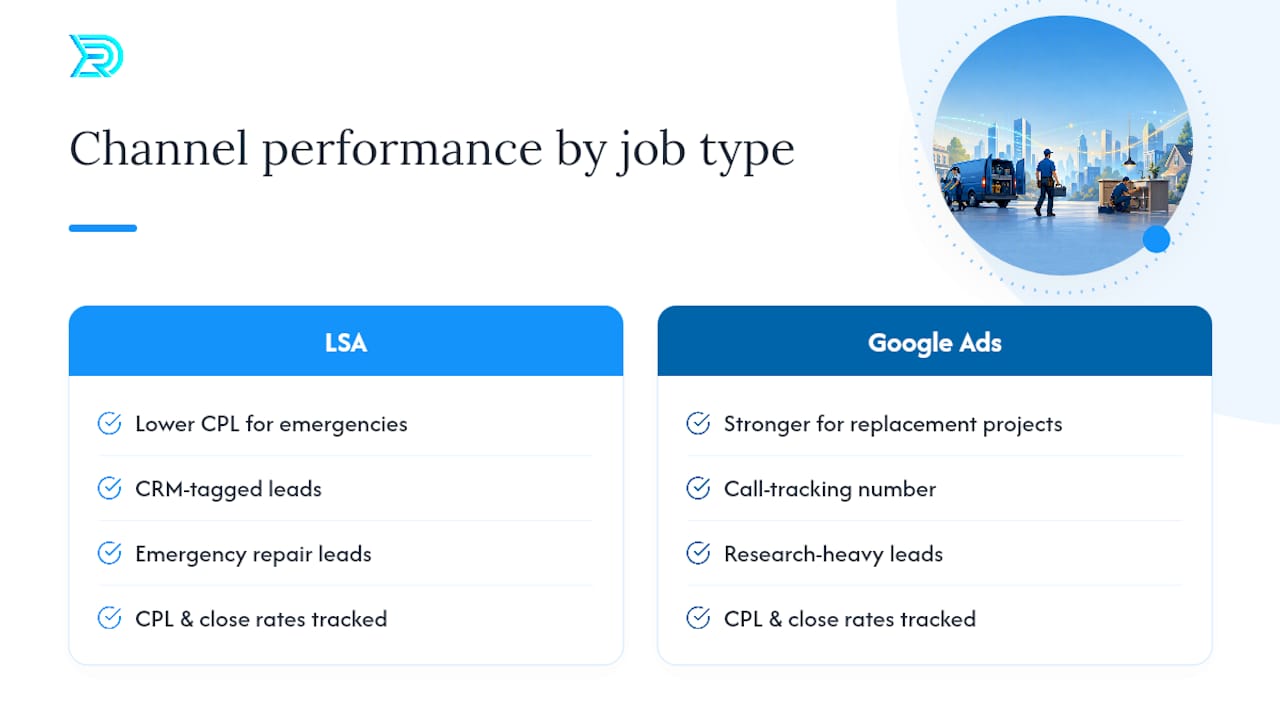
Resultsdigitalus restructured their attribution from the ground up. LSA leads were tagged separately in the CRM, a dedicated call tracking number was assigned to the Google Ads landing page, and a weekly review cadence was established to compare CPL and close rates by source. Within the first 90 days, the team identified that LSA was producing a significantly lower CPL for emergency repair calls, while Google Ads Search was outperforming on larger replacement projects where homeowners had spent more time researching. Budget was reallocated accordingly.
Over the following years, that contractor scaled significantly before selling the business for a substantial amount. Attribution clarity was the foundation that made scaling possible; without knowing which channel was closing jobs, every budget decision would have been a guess.
Pro Tip: Before you touch bids or budgets, fix your attribution. You cannot optimize what you cannot measure. Set up source tagging in your CRM on day one, not after you’ve spent three months wondering why your CPL keeps rising.
Key Takeaways
For most local service contractors in the United States, LSA should be the first channel launched, with Google Ads added once you have a CPL baseline and a converting landing page.
| Point | Details |
|---|---|
| Start with LSA if eligible | LSA’s pay-per-lead model protects budget while you establish a CPL baseline in your market. |
| Add Google Ads after 30 days | Layer in Search campaigns once you have real lead data to benchmark against. |
| Track by lead-to-customer rate | Raw CPL is misleading; always measure which channel closes more booked jobs. |
| Fix attribution before scaling | Tag every lead by source in your CRM from day one or budget decisions stay guesswork. |
| Resultsdigitalus manages both | Resultsdigitalus sets up LSA, Google Ads, and full attribution for contractors across the U.S. with no long-term contracts. |
What Results Digital sees work most often (and the mistakes to avoid)
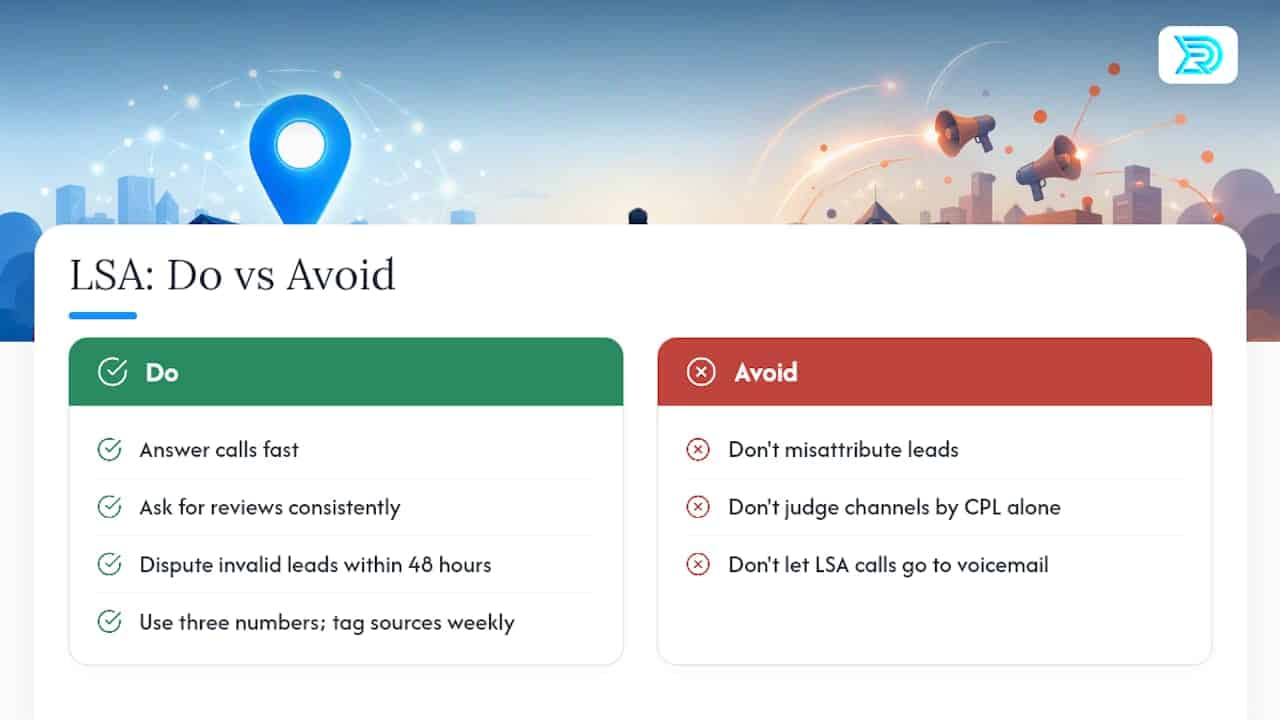
The contractors who get the most out of LSA are not necessarily the ones with the highest bids. They’re the ones who answer the phone fast, ask for reviews consistently, and dispute invalid leads within 48 hours. Those three operational habits compound into a ranking advantage that no bid increase can replicate.
The most common mistake we see is misattributing leads. A contractor runs LSA and Google Ads simultaneously, gets a call, and logs it as “Google” without specifying which channel. After 90 days, they have no idea which platform is producing booked jobs and which is producing tire-kickers. The fix is simple: three phone numbers, three CRM source tags, one weekly review meeting.
The second mistake is over-indexing on CPL without checking conversion. A $20 LSA lead that closes 40% of the time is worth far more than a $12 Google Ads click that closes at 8%. We’ve seen contractors pause their LSA campaigns because the CPL looked high, only to discover after the fact that LSA was their best-closing channel by a wide margin.
The third is underspending on call handling. An LSA lead that goes to voicemail during business hours is a lost job. Staff the phones, write a script, and track call answer rates the same way you track CPL. The ad gets the phone to ring; your team closes the job.
How Resultsdigitalus helps contractors run both channels profitably
Running LSA and Google Ads together without a clean attribution system is like sending a sales rep out without a pitch or a way to track which deals they closed. Resultsdigitalus builds the full system: LSA verification and profile setup, Google Ads campaign structure, call tracking, CRM source tagging, and weekly performance reviews, all engineered specifically for roofing, siding, gutter, and general contracting businesses.
The engagement model is straightforward: audit your current lead channels, identify the fastest path to a lower CPL and higher close rate, then test and scale with real data. Resultsdigitalus works with one contractor per trade per market, so your campaigns compete against the market, not against another client on the same roster. No long-term contracts. Every month has to earn the next.
If you’re ready to know exactly which channel is closing your jobs, request a contractor marketing audit and get a clear picture of where your next booked job is coming from.
Useful sources and official documentation
- Reach Local Customers with Local Service Ads – Google Ads
- Google Ads vs Local Services Ads for small business marketing – Google Ads
- Google Local Services Ads vs. Search Ads: Which drives better local leads?
- Getting started with Local Services Ads – United States
- support.google.com
- policies.google.com
- Results Digital
