
Weather-based ads work, and the data backs it up: weather-triggered search bidding drove a 46% increase in conversion volume for one restoration advertiser. The catch is that most roofing companies build their storm campaign after the hail already fell, which means they’re bidding against every other contractor in a market that’s now flooded with search volume. The fix is pre-staging: build the campaign, the landing page, the call tracking number, and the budget cap before the sky turns green, then flip it live within hours of a verified alert.
TL;DR:
- Building and pre-staging storm campaigns before a storm hits allows contractors to activate quickly and avoid bidding against flooded search volume.
- Using forecast, real-time, and recent-past weather triggers with near-instant data ensures campaigns launch at the right moment and capture homeowner urgency.
- Hyperlocal targeting with radius and exclusion zones maximizes ad spend efficiency by focusing on accessible neighborhoods and preventing wasted impressions.
- Setting budgets based on field capacity and starting bidding within 12 to 48 hours of alerts prevents overspending and maintains lead quality.
- Preparation, including campaign testing and staff training, is more critical to storm ad success than reaction speed during weather events.
Table of Contents
- What Are the Best Weather-Based Ad Tactics for Roofers?
- How Do Weather Triggers and Data Feeds Actually Work?
- Which Platforms and Targeting Recipes Work Best?
- How Should You Time and Budget the Storm Window?
- What Belongs on Your Storm Campaign Setup Checklist?
- What Ad Creative and Offers Actually Convert?
- Which KPIs and Optimization Steps Matter Most?
- What Pitfalls Should Roofers Avoid With Storm Ads?
- How Results Digital Approaches Weather-Triggered Campaigns
- Our Take: Storm Ads Reward Preparation, Not Reflexes
- Ready to Put a Storm-Response System in Place?
- Sources
What Are the Best Weather-Based Ad Tactics for Roofers?
If you only have an afternoon to build a storm-response system, prioritize these five moves in order.
- Pre-stage a paused storm campaign. Build it with placeholder ZIP or radius targeting and one isolated conversion action, ready to activate the moment a storm hits your service area.
- Automate the trigger. Pull data from NWS/NOAA feeds or a weather API so the campaign turns on and off without someone manually watching radar at midnight.
- Tighten your geography. Use ZIP-level swaths or radius rings, and set exclusion zones around areas where you already have more leads than crews.
- Build a call-first conversion path. Route every storm click toward a phone call and an inspection booking, and keep insurance-claim messaging separate from proactive replacement offers.
- Front-load your budget. Put a daily cap on the first 24 to 72 hours, since that’s when search volume and homeowner urgency peak.
Demand for roofing work spikes predictably after hail and high wind, which is why weather-based triggers correlate reliably with service demand in the home-services category. The contractors who win the lead aren’t necessarily the best roofers in town. They’re the ones whose ads were live when the search happened.
How Do Weather Triggers and Data Feeds Actually Work?
Weather triggers fall into three categories, and each one calls for a different activation rule.
- Forecast triggers fire 12 to 48 hours before a storm arrives, giving you a window for pre-storm outreach like tarping, gutter checks, or “get ahead of the storm” inspection offers.
- Real-time triggers come from watches and warnings issued by NWS/NOAA or the Storm Prediction Center, and they’re the backbone of in-the-moment activation.
- Recent-past triggers confirm an event already happened, which matters because a large share of homeowners don’t start searching for a roofer until they’ve walked outside and seen the damage.
Latency matters more than most contractors realize. A feed that updates every 15 minutes is fine for forecast triggers, but real-time storm alerts need near-instant data or you’ll launch after your competitors already have impression share locked up. Facebook Storm Alert Advertising relies on NWS-verified storm zones specifically because that verification layer keeps the geo-fencing accurate down to the neighborhood.
Threshold benchmark: Most practitioners set automation rules around 1-inch hail or greater and sustained winds above 58 mph, the National Weather Service’s own severe thunderstorm criteria, since anything below that rarely generates roof damage worth a paid campaign.
Which Platforms and Targeting Recipes Work Best?
Not every platform earns the same role in a storm-response system.
Google Ads is your highest-intent channel because it captures people actively typing “roof leak repair near me.” Pre-stage the campaign with an isolated conversion action, then upload ZIP-level location groups built from NOAA or SPC storm swath polygons.
Meta/Facebook gives you reach inside the storm zone before people start searching. Facebook’s Weather Audience targeting combined with radius targeting and lookalikes of recent converters lets you show up in someone’s feed the same day their gutters filled with hail.
Display and programmatic don’t belong in the 72-hour surge window. Use them for retargeting people who visited your site during the storm but didn’t call, and for general brand awareness outside active weather events.
Targeting radius depends on the event type:
- 1 to 3 miles for hyperlocal hail tracks or wind damage confined to a few neighborhoods
- 15 to 30 miles for regional events like a hurricane’s outer bands or a widespread windstorm
- DMA-level targeting when a single storm system affects an entire metro and you have crews to cover it
Hyperlocal targeting paired with exclusion zones reduces wasted spend and keeps leads matched to where your crews can actually reach.
How Should You Time and Budget the Storm Window?
Launch timing and budget pacing decide whether a storm campaign makes you money or just makes you busy.
- Launch within 12 to 48 hours of a verified watch or warning, with the heaviest push happening in the first 24 hours when search competition is lowest and homeowner urgency is highest.
- Start bidding on Maximize Conversions with a hard daily cap for hours zero through 72, then switch to target CPA once you’ve logged roughly 30 conversions and Smart Bidding has enough data to work with.
- Calculate your daily cap from field capacity, not from what you’re willing to spend. Multiply your daily inspection slots by your average conversion-to-contract rate to find the lead volume you can actually service.
- Split your monthly budget 60 to 70% toward active storm campaigns during declared weather windows, with the remainder funding evergreen demand generation so you’re not starting from zero between storms.
Pro Tip: Set your daily cap a notch below your true capacity, not at it. A crew that’s booked solid feels like success until the one-star reviews start rolling in from homeowners who waited nine days for a callback.
What Belongs on Your Storm Campaign Setup Checklist?
The gap between contractors who profit from a storm and contractors who miss it entirely comes down to prep work done weeks before any weather shows up.
- Pre-stage the campaign shell: paused storm campaign, placeholder location groups, and one isolated conversion action so Smart Bidding never mixes storm and evergreen data.
- Build separate assets: a dedicated storm landing page and a unique call-tracking number, distinct from your evergreen site and number.
- Write the CSR script in advance: booking flow, honest ETA language, and clear talking points on how insurance claims typically work.
- Ingest and convert weather data: pull NOAA/SPC swath polygons, convert them to ZIP lists, and test that the upload process into your ad accounts actually works before you need it live.
This structure is what pre-staged storm-response account architecture is built to solve: keeping the campaign that fires on a hailstorm from contaminating the learning data of your steady, year-round campaigns.
What Ad Creative and Offers Actually Convert?
Weather-specific copy outperforms generic roofing ads because it tells the homeowner you know exactly what just happened to their roof. Weather-relevant phrasing in ad copy raised conversion rates in tested campaigns, and the same logic applies to landing pages.
- Emergency search copy: “Hail Damage in [City]? Free Inspection Today” beats “Roofing Services Near You” because it names the exact problem.
- Landing page CTA: lead with “Book Your Free Inspection” as the single action, not a contact form buried under service descriptions.
- Insurance messaging: separate ad groups for “We Work With Your Insurance Claim” versus proactive offers like “Upgrade Your Roof Before Winter.”
- Seasonal, non-storm offers: fall gutter and warranty upgrade promotions tied to seasonal roofing promotions keep the funnel active between weather events.
- Testing: A/B test urgency language (“Act before more rain hits”) against reassurance language (“Licensed, insured, same-day inspections”), and rotate in dynamic local identifiers pulling the city name from search queries.
Which KPIs and Optimization Steps Matter Most?
Storm campaigns live or die on the metrics you’re actually watching, not the ones that feel comfortable to report.
- Inspection booked is your true north metric, since a lead who books nothing is just a click that cost money.
- Qualified call rate, cost per lead, and impression share tell you whether you’re winning the auction and whether the calls coming in are real prospects.
- Feed CRM inspection-booked events and call-tracking conversions into the isolated conversion action so Smart Bidding optimizes toward the outcome that pays your crews, not toward form fills that go nowhere.
The timeline runs in three phases: bid aggressively for the first 0 to 72 hours while urgency is highest, shift bidding strategy on days 4 through 10 as conversion data stabilizes, then taper spend from day 11 onward and analyze which ZIPs and creative actually produced signed contracts.
What Pitfalls Should Roofers Avoid With Storm Ads?
The fastest way to turn a good storm week into a reputational problem is overselling your own capacity. A daily budget cap tied to field capacity, plus exclusion zones around already-saturated neighborhoods, keeps lead volume matched to what your crews can inspect.
- Never let a storm lead go to voicemail. Route every call to a live CSR or a same-day callback guarantee.
- Train CSRs to give honest ETAs and explain the insurance claim process in plain language, not vague promises.
- Follow each platform’s policies on emergency-related advertising, and avoid language that pressures homeowners rather than informing them.
- Watch your common roofing ad account mistakes around negative keywords, since storm searches attract a lot of DIY and insurance-adjuster traffic that will burn your budget without ever converting.
How Results Digital Approaches Weather-Triggered Campaigns
Results Digital has worked exclusively with roofing contractors since it was founded in 2015, and that focus shapes how storm-response systems get built for clients. One Florida roofing client experienced significant growth, a trajectory that started with disciplined lead generation, not lucky timing.
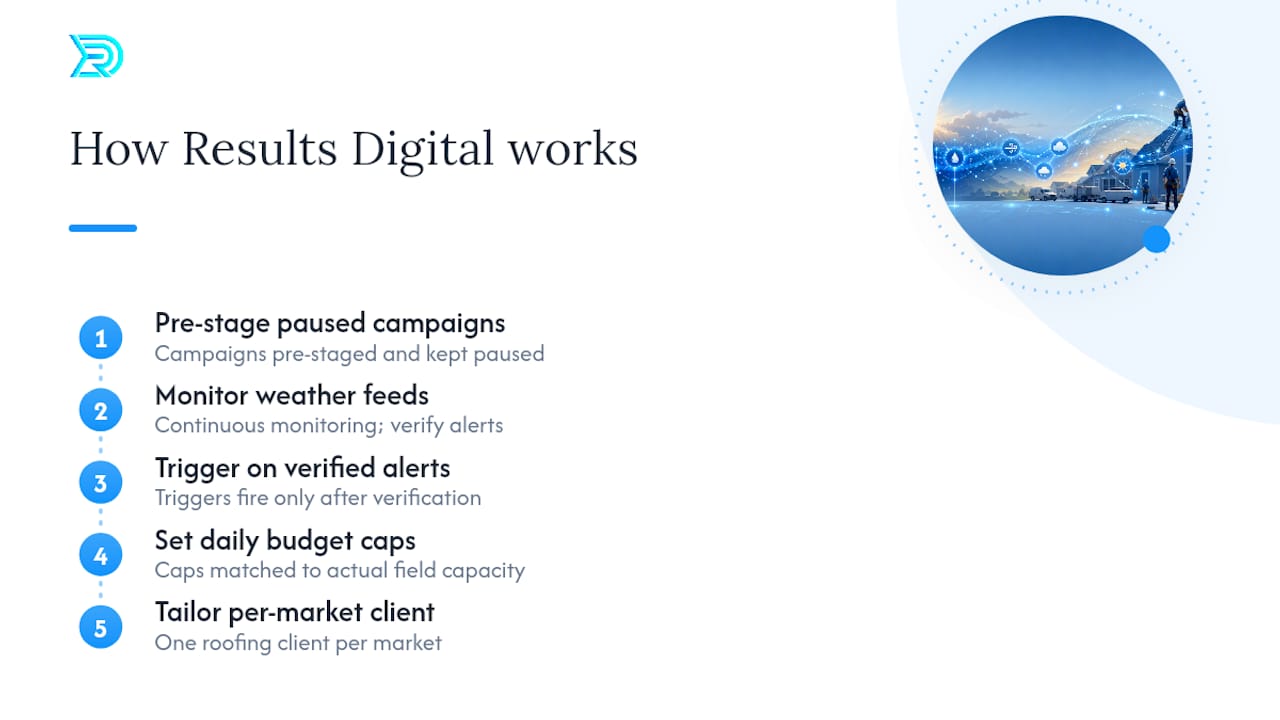
The operational approach mirrors the playbook above: pre-staged campaigns sitting paused and ready, weather feeds monitored so triggers fire on verified alerts rather than guesswork, and daily budget caps set against each client’s actual field capacity. Because the agency partners exclusively with one roofing company per market, the storm-window strategy built for one client is tailored specifically for them.
Our Take: Storm Ads Reward Preparation, Not Reflexes
The conventional advice on weather-based advertising treats it like a reaction speed contest: whoever launches fastest after the storm wins. That’s backwards. The contractors who consistently profit from storm season aren’t the fastest typers when a hail alert pings their phone. They’re the ones who did the boring work months earlier: building the paused campaign, writing the CSR script, testing the NOAA-to-ZIP-list workflow so it actually works under pressure.
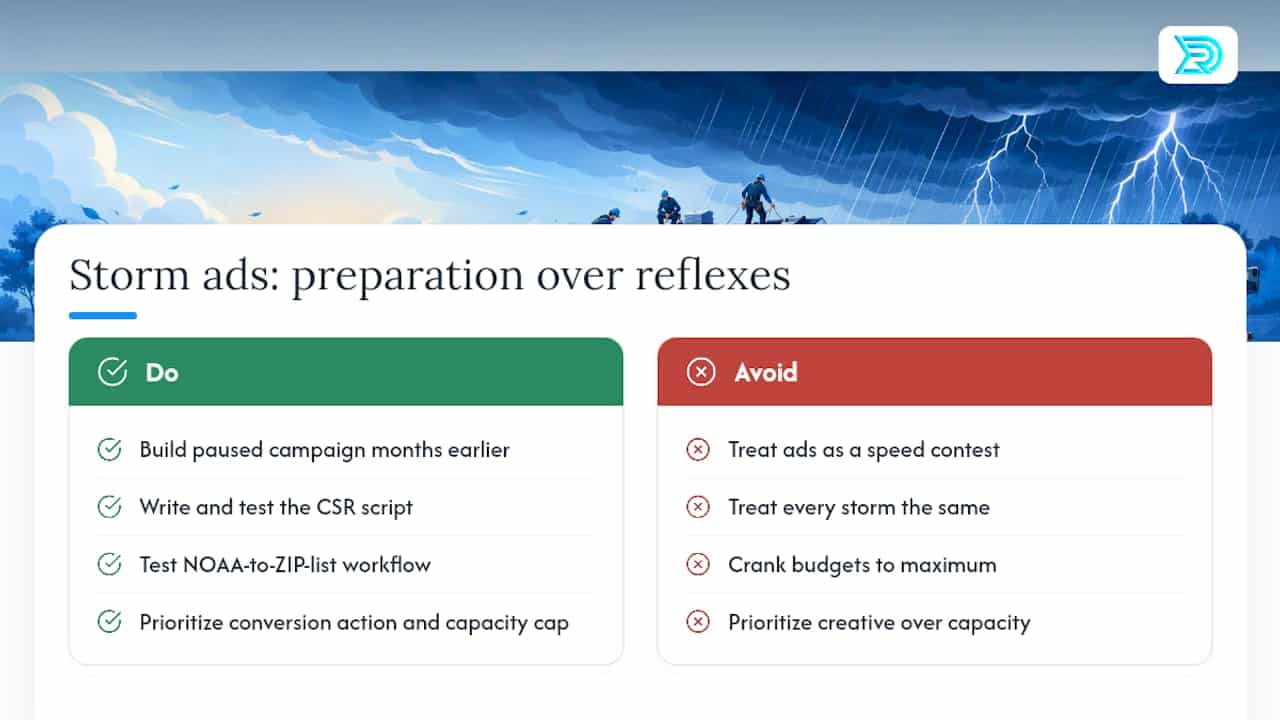
Where most roofing companies go wrong is treating every storm the same way, cranking budgets to maximum and hoping volume solves the problem. It doesn’t. A hailstorm that drops your daily lead volume past what your crews can inspect in a reasonable window doesn’t grow your business. It generates one-star reviews from homeowners who waited two weeks for a callback.
Prioritize the isolated conversion action and the capacity-based budget cap before you worry about creative polish or platform selection. Everything else in this playbook is optimization. Those two decisions are the ones that determine whether your storm campaign makes money or just makes noise.
— Results
Ready to Put a Storm-Response System in Place?
Building the pre-staged campaign, the automated weather trigger, and the capacity-based budget cap takes real setup time, and most roofing companies are trying to do it for the first time in the middle of an actual storm. This system is built before the season starts, so the campaign is sitting paused and ready instead of getting built from scratch while your phone is already ringing off the hook.

The process starts with a readiness audit of your current ad accounts and field capacity, followed by a prioritized pre-staging checklist built around your service area and crew size, then go-live support when the first alert comes through. Because the agency works with only one roofing company per market, the campaign structure built for your business stays exclusive to you. Visit the digital marketing services for general contractors page to request an audit and get your storm-response system built before the next front rolls through.
Sources
- Tinuiti increases leads for restoration client JES with intelligent weather triggers for Search | WeatherAds Case Studies
- Facebook Storm Alert Advertising Roofing: A Quick Guide | RoofPredict Blog
