
Bid on competitor brand terms only after you’re closing 30 or more conversions a month from non-brand search and your intake team can qualify calls fast. If you don’t meet that bar yet, put your budget into defending your own brand name instead. If you meet it, the next move is a controlled 30-day test with a hard bid cap, not an open-ended campaign.
TL;DR:
- You need at least 30 conversions per month from non-brand campaigns for 60 days before testing competitor brand bidding to ensure accurate data.
- Structuring campaigns into separate brand, non-brand, and competitor groups with dedicated budgets and precise match types is crucial for controlling spend and effectiveness.
- Bidding on competitors’ names is legal, but ad copy must avoid using trademarks once a complaint is filed to prevent policy violations and penalties.
- A dedicated landing page with clear messaging and direct calls to action improves conversion rates and message match for competitor traffic.
- Monitoring impression share and overlap with tools like Auction Insights helps detect competitor retaliation, guiding whether to extend or halt your bidding tests.
Table of Contents
- What Is Roofing Brand Bidding, and Are You Ready for It?
- Step-by-Step Campaign Setup for Competitor-Brand Targeting
- Ad Copy Rules and Google Trademark Policy, Explained
- Building a Landing Page That Converts Competitor Traffic
- Setting Bidding and Budget Guardrails That Won’t Bleed Cash
- How to Measure Incrementality and Decide Keep or Kill
- Phone and CRM Operations for Competitor-Sourced Leads
- Legal Risks of Bidding on Competitor Brand Terms
- Monitoring and Managing Competitor Reactions
- Long-Term Brand Impact and Reputation Considerations
- Tools and Software for Automating Competitor Campaigns
- A Verdict Before You Spend Another Dollar
- Why Specialization Matters in Roofing Brand Bidding
- How Results Digital Runs a Compliant Competitor-Brand Test for You
- Sources
What Is Roofing Brand Bidding, and Are You Ready for It?
Roofing brand bidding means buying paid-search ads that trigger on your competitors’ company names, or protecting your own name from competitors doing the same thing to you. It’s a distinct discipline from standard roofing PPC, closer to a chess move than a keyword expansion. Before you spend a dollar on a competitor’s name, run this self-assessment.
Conversion baseline. You need at least 30 conversions a month from your existing non-brand campaigns before you touch competitor terms. That volume gives Google’s algorithms and your own reporting enough signal to tell a good test from noise. Below that threshold, you’re guessing with real money.
If your average job margin and lifetime value can’t absorb a higher cost per lead, don’t start.
Operational readiness. Same-day scheduling capacity, trained phone scripts, and a clear warranty-versus-new-customer triage process all need to exist before the first click lands.
Data readiness. Clean conversion tracking, a well-organized Google Ads account, and a habit of checking Auction Insights weekly are non-negotiable.
- Non-brand conversions: 30+ per month, sustained for at least 60 days
- Gross margin per job: enough to cover a CPA 2 to 4 times your normal blended rate
- Phone intake: scripted, staffed, and tested for same-day response
- Tracking: call tracking and form tracking both firing correctly in Google Ads
Pro Tip: Pull your last 90 days of non-brand conversion data before you build anything. If you can’t produce that report in five minutes, your account isn’t ready for a competitor test yet.
Step-by-Step Campaign Setup for Competitor-Brand Targeting
Structure comes first, spend comes second. A messy account structure is the fastest way to burn a test budget without learning anything useful.
- Build three separate campaigns — brand, non-brand, and competitor. Each needs its own budget so a spike in one doesn’t starve the others.
- Choose match types deliberately. Use exact and phrase match on competitor brand queries, layered with intent modifiers like “reviews,” “pricing,” “vs,” and “alternatives.” Broad match invites irrelevant traffic and inflates spend fast.
- Load negative keywords at the campaign level before launch: “support,” “careers,” “login,” “warranty,” and any term tied to existing-customer service requests.
- Turn off automation for now. Disable Dynamic Keyword Insertion and automatically created assets. Leave Smart Bidding alone until you’ve accumulated real conversion data.
- Route every click to a dedicated landing page, never your homepage, so the message a searcher sees matches exactly what your ad promised.
This structure mirrors the approach Search Engine Journal recommends for competitor campaigns: isolate budget, tighten match types, and control what shows up on the page after the click.
- Campaign 1: Brand defense (your own name)
- Campaign 2: Non-brand (service + location terms)
- Campaign 3: Competitor brand test (isolated budget, capped spend)
Ad Copy Rules and Google Trademark Policy, Explained
Bidding on a competitor’s name as a keyword is allowed. What you write in the ad itself is where the rules tighten. Google’s trademark policy permits keyword bidding but restricts using a trademark in ad text or your display URL once the trademark owner files a complaint naming you as the advertiser.
Two U.S. appellate rulings in October 2024 reinforced that buying a competitor’s brand as a keyword isn’t infringement by itself, as long as your ad clearly identifies you as the advertiser, according to Keygrow’s legal summary. Quality Score and cost per click still take a hit on competitor terms, so treat compliance as smart strategy, not just legal cover.
- Turn off Dynamic Keyword Insertion; it can accidentally drop a competitor’s name into your ad text.
- Write value-led headlines: price, availability, warranty length, response time.
- If a trademark complaint arrives, Google will notify you. Review the specific restriction and appeal if your usage falls under fair use for comparative claims.
- Compliant headline example: “24/7 Roof Repair, 5-Year Warranty” — no competitor name, all differentiation.
- Disallowed pattern: inserting a competitor’s exact brand name into the headline or display URL after a complaint is on file.
Competitor keyword clicks often run multiple times the cost of your own brand clicks, a gap that makes disciplined ad copy worth the extra five minutes.
Building a Landing Page That Converts Competitor Traffic
A homepage tells a competitor-brand searcher nothing about why they should trust you instead. A dedicated comparison page does.
Lead with your logo and company name in the first line, so there’s zero confusion about who’s talking to them. Follow immediately with your single strongest differentiator, whether that’s a warranty length, a same-day inspection guarantee, or a specific price advantage. Add social proof right below it, not buried at the bottom of the page.
- Skip the generic homepage; build a page purpose-built for “vs” and “alternative” searches.
- Include one small proof point (project count, years in business, review rating) instead of a wall of testimonials.
- Give the visitor one clear action: “Book a free inspection” or “Call to compare pricing,” not five competing buttons.
- Tag every visit with UTM parameters and a campaign identifier, and flag the lead source in your CRM the moment it comes in.
Pro Tip: Write the headline of your comparison page before you write anything else on it. If that headline can’t beat your best competitor’s actual homepage headline, don’t launch the campaign yet.
Message match between ad and landing page also feeds directly into Quality Score, which shapes what you pay per click on every one of these terms.
Setting Bidding and Budget Guardrails That Won’t Bleed Cash
Manual CPC or Maximize Clicks with a firm bid cap is the right starting point. Smart Bidding needs volume to learn from, and a competitor campaign under 30 conversions gives it nothing useful to optimize against.
Allocate a modest percentage of your total PPC budget to the initial competitor test, then adjust once you see real cost-per-lead numbers against your own unit economics. Mobile searches on competitor brand terms are frequently navigational, meaning the person already knows who they want to call, so consider capping or reducing mobile bid modifiers early in the test rather than matching your standard device split.
- Set a daily spend cap you can absorb losing entirely for 30 days.
- Skip Target Impression Share; it drives bids up fast with no CPA ceiling.
- Review Quality Score weekly; a low score on competitor terms often signals your landing page needs work, not just your bid.
- Reassess the mobile bid modifier after two weeks of data, not before.
Lower Quality Score on competitor keywords is common enough that Keygrow’s guidance on ad and keyword relevance treats it as an expected cost of entry, not a red flag to panic over.
How to Measure Incrementality and Decide Keep or Kill
Set your tolerance band before you launch, not after you see the numbers.
- Primary KPI: competitor-campaign CPA compared against your existing non-brand benchmark. Decide in advance how much higher you’ll tolerate, commonly 2 to 4 times, given that competitor clicks run that much more expensive industry-wide.
- Run an incrementality check. A geo-paused test or a holdout period, where you pause the campaign in half your service area for two weeks, tells you whether these leads are truly new or leads you’d have gotten anyway.
- Track downstream numbers, not just clicks: booked-estimate rate, close rate, and revenue per lead.
- Watch Auction Insights weekly for impression-share drift, which flags when a competitor starts reacting to your campaign.
If CPA stays inside your tolerance band and booked-estimate rate holds after 30 days, extend the test. If it doesn’t, kill it and redirect that budget to brand defense or non-brand expansion.
Phone and CRM Operations for Competitor-Sourced Leads
A great campaign dies fast at a front desk that can’t handle the calls it generates.
Build a short qualification script that identifies comparison shoppers within the first 30 seconds, asking who they’re currently working with and what stage they’re at. Train your team to spot warranty or support requests disguised as new inquiries; those calls cost you money without ever becoming revenue. Tag every competitor-sourced lead in your CRM so you can run cohort analysis on close rate separately from your other channels.
- Script opener: “Are you currently getting a second opinion, or is this your first estimate?”
- Flag any call mentioning an existing warranty claim before it reaches your estimator.
- Pause the campaign immediately if same-day response times slip below your standard.
Pro Tip: Record your first 20 competitor-sourced calls and review them personally. You’ll learn more about intent quality in one afternoon than a month of dashboard metrics.
Legal Risks of Bidding on Competitor Brand Terms
Buying a competitor’s name as a keyword is legal in the United States. The risk sits almost entirely in your ad text, not your keyword list.
Two appellate rulings in October 2024 confirmed that keyword bidding alone doesn’t constitute trademark infringement when your ad clearly names you as the advertiser, according to Keygrow’s summary of the case law. Google’s own policy backs this distinction: keywords aren’t restricted the way ad text and display URLs are, and enforcement kicks in mainly after a trademark owner files a specific complaint naming your account, per Google’s trademark policy.
The practical risk isn’t a lawsuit. It’s a policy strike that pauses your ads while you sort out a complaint, or a Quality Score penalty from running ad text too close to someone else’s brand. Both are avoidable with the same discipline: never put a competitor’s trademark in your headline, description, or URL, and keep your comparative claims factual and specific rather than implying any affiliation.
Document your ad copy decisions and keep screenshots of your live ads dated. If a complaint does land, you’ll want a clear record showing your ads never used the trademarked term directly. This matters more for roofing than most trades, since local reputation and word-of-mouth referrals mean a public dispute with a named competitor can spill outside the ad platform entirely. Keep the fight contained to the auction, not the community Facebook group.
Monitoring and Managing Competitor Reactions
Once you start bidding on a competitor’s name, assume they’ll notice within a few weeks. Auction Insights is where you’ll see it first.
Watch impression share and overlap rate on your own brand campaign closely after launching a competitor test. A sudden jump in a rival’s impression share on your brand terms is the clearest signal they’re bidding back. When that happens, don’t panic and don’t retaliate with a bigger budget immediately. Check whether your own brand CPA has moved; if it hasn’t, the counter-bid may be more bark than bite.
Some competitors will escalate to a trademark complaint instead of a bidding war. That’s a policy process, not a legal threat, and it typically just requires you to adjust ad copy rather than pull the campaign entirely.
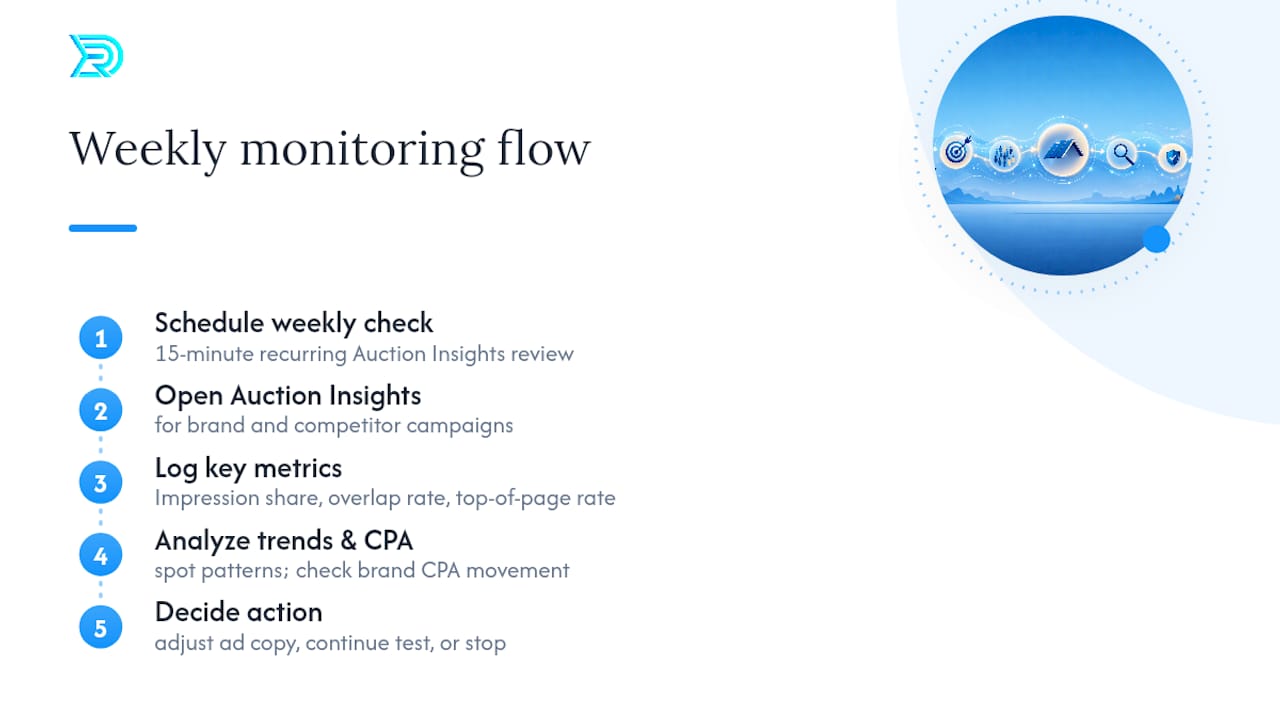
Set a recurring 15-minute weekly check on Auction Insights for both your brand and competitor campaigns. Log impression share, overlap rate, and top-of-page rate over time so you can spot a pattern instead of reacting to a single bad week. If a rival’s response drives your own brand CPA up significantly and sustainably, that’s the point to reassess whether the competitor test is still worth the crossfire, or whether a truce, meaning both sides quietly back off competitor terms, serves everyone’s margins better.
Long-Term Brand Impact and Reputation Considerations
A competitor bidding on your name isn’t just a paid-search annoyance. It’s a signal about how searchers perceive your market position, and it shapes how much you need to invest in brand defense long-term.
Defensive brand bidding on your own name is worth maintaining almost indefinitely for roofers, since losing that click share to a rival costs you leads from people who were already searching for you by name. Competitor campaigns you run against others should be treated as tests with a defined lifespan, not a permanent budget line.
There’s a reputational dimension too. If your ad copy ever strays into disparaging a competitor by name, even indirectly, that risks a public backlash in a local market where referrals and reviews carry outsized weight. Roofing is a trust-driven purchase; homeowners talk to neighbors, read Google reviews, and remember who played it straight. Stick to comparing your service on facts, price, and availability, and let that discipline protect your name the way it should.
Review your competitor campaigns quarterly against your overall brand health, not just CPA. If a rival’s counter-bidding starts driving up your own brand CPA every time you run a test, factor that ongoing cost into whether the campaign is still worth running at all.
Tools and Software for Automating Competitor Campaigns
Manual management works fine for a first test, but scaling competitor bidding across multiple service areas benefits from the right tooling.
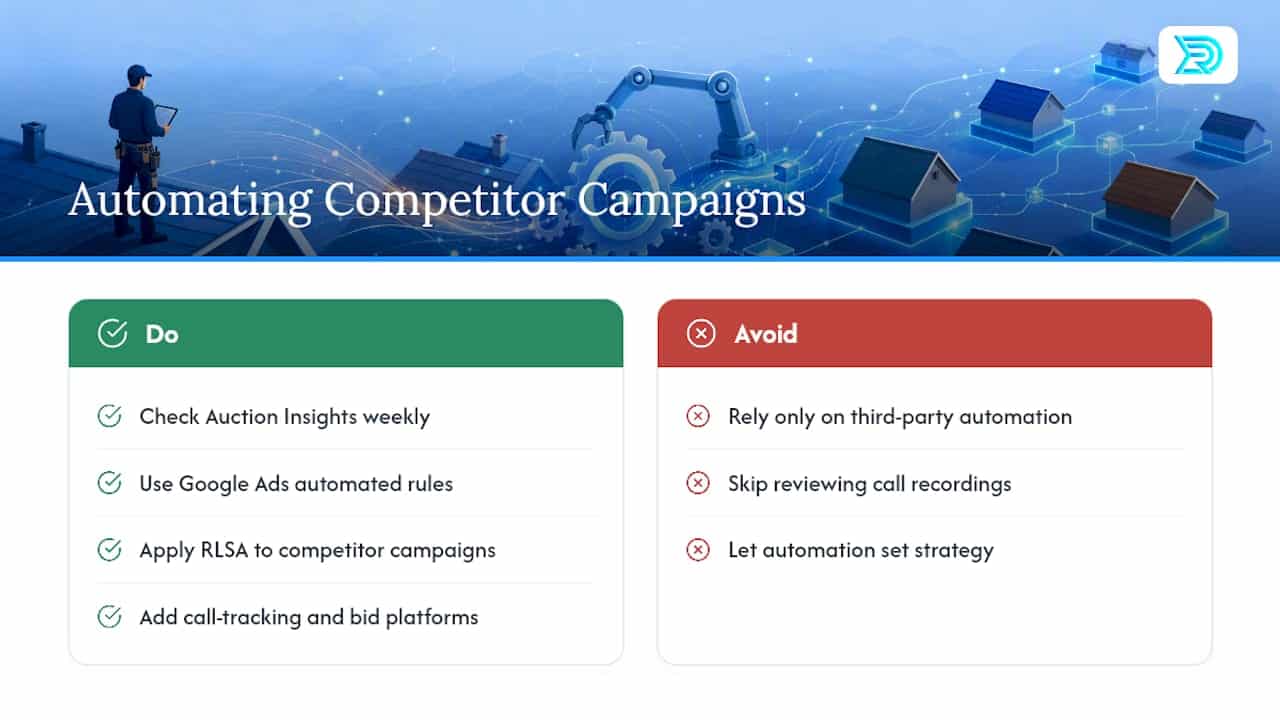
Google Ads’ built-in Auction Insights report stays your primary monitoring tool regardless of what else you add, since it’s the only place that shows exactly how you and named competitors overlap on the same auctions. Beyond that, rules-based automation inside Google Ads, like automated rules for bid caps and budget pacing, lets you enforce the guardrails from earlier sections without checking the account daily.
For remarketing specifically, layering RLSA (Remarketing Lists for Search Ads) onto a competitor campaign lets you bid on competitor terms only for people who’ve already visited your site, which tends to lower CPA compared to bidding on cold traffic, according to Growleads’ guidance on remarketing and competitor bidding. That’s a meaningful lever once your test proves out and you’re ready to scale without inflating cost per lead.
Third-party bid management platforms and call-tracking integrations round out the stack, but none of them replace the discipline of checking Auction Insights weekly and reviewing actual call recordings. Automation should enforce the rules you’ve already set, not set the rules for you.
A Verdict Before You Spend Another Dollar
If you meet the 30-conversion baseline and your intake team can qualify calls same-day, build the skeleton campaign this week. If you don’t, spend that same energy tightening brand defense instead. Either way, check CPA and booked-estimate rate at day 30 and day 60 before committing further budget.
Why Specialization Matters in Roofing Brand Bidding
Paid-search discipline can be a key part of growth stories for roofing clients, supporting expansion from a few crews to many over time. Two habits we enforce on every account: hit the conversion baseline before testing competitor terms, and never launch a campaign the intake team isn’t ready to handle. If you want a controlled pilot with real measurement, that’s the conversation worth having.
— Results
How Results Digital Runs a Compliant Competitor-Brand Test for You
Working exclusively with one roofing company per market means competitor-bidding strategies avoid overlap with multiple contractors competing for the same clicks. Partnering with an agency familiar with conversion baselines, intake scripts, and landing page structures ensures expertise in these areas based on regular work with contractors.
A typical pilot includes campaign setup with isolated budgets, a dedicated comparison landing page, an intake script tailored to crews, and weekly reporting against CPA benchmarks set at the start. The pilot is designed without a long-term contract commitment beyond the initial period. If a controlled, measured test on Google Ads PPC for general contractors sounds like the next right move for your business, reach out to Resultsdigitalus and get a pilot scoped around your actual numbers, not a generic template.
Sources
- Google Ads trademark policy (Support)
- Can I Use Competitor Brand Keywords in Google Ads? (Keygrow)
- Search Engine Journal: Tips for running competitor campaigns
