
Most Google Business Profile suspensions are reversible. Diagnose the exact policy trigger, gather the right documents, and file one well-documented appeal through Google’s appeals tool. Skip straight to appealing without fixing the underlying issue, and you’ll likely get denied and reset your own timeline. Don’t create a duplicate profile or make bulk edits while your appeal sits under review.
TL;DR:
- Most suspensions can be reversed if you identify the specific policy violation, gather targeted evidence, and submit a well-documented appeal within the time limit.
- Key issues triggering suspensions include name stuffing, inconsistent NAP details, using a PO box for physical storefronts, duplicate listings, and inappropriate address types for service businesses.
- Effective evidence includes recent utility bills, business licenses, lease agreements, tax documents, and geotagged photos of signage and vehicles; all files should be staged before appeal submission.
- Appeals must be submitted from the correct Google account, with a clear, factual explanation referencing attached documents; rushing evidence upload risks restarting the process.
- After submitting an appeal, monitor the status daily, fix any denial reasons with new evidence, and maintain profile compliance to prevent future suspensions.
Table of Contents
- Google Business Profile Suspension: Diagnose the Cause First
- What Documents and Photos Actually Help Your Appeal
- How to Submit Your Appeal Through Google’s Tool
- What to Expect After You File the Appeal
- Your Appeal Got Denied: What Now?
- Keep Your Profile Compliant So This Doesn’t Happen Again
- How a Specialist Agency Handles Reinstatement for Contractors
- Get Your Profile Back and Protect It Going Forward
- Where to Verify These Suspension and Appeal Rules
- Sources
Google Business Profile Suspension: Diagnose the Cause First
Before you touch the appeals tool, figure out which rule you tripped. Google’s suspension logic isn’t random. It’s triggered by a specific mismatch between what your profile claims and what Google can verify.
Run through this checklist on your live listing:
- Business name: Does it match your legal registration exactly, with no city names, service keywords, or phone numbers stuffed in? Google’s Business Profile guidelines flag name stuffing as a direct suspension trigger.
- NAP consistency: Compare your name, address, and phone number across your website, Yelp, your state’s business registry, and every directory listing.
- Address type: If you’re a storefront, confirm you’re not using a PO box or a virtual office. If you’re a service area business, check that your address is hidden and your service radius is set correctly rather than displaying a residential or commercial location Google can’t verify.
- Duplicate listings: Search your business name and phone number in Maps. A second listing (even one you didn’t create) can trigger suspension on both.
- Account access: Audit who holds Owner or Manager roles. A restricted Google Account tied to your profile can cascade suspensions across every listing that account manages.
- Physical verification: Pull up Street View and check nearby local citations against your listed hours and signage. If your storefront doesn’t visibly match what’s on the profile, that’s often the root cause.
For roofers, siding, and general contractors specifically, algorithmic enforcement around lead-farm and fake-listing patterns has tightened, and even a legitimate business adding a city or service keyword to its name can trip the same filter as a spam listing. If your business operates across a territory rather than a fixed storefront, review your service area business setup before assuming the address is the problem.
What Documents and Photos Actually Help Your Appeal
Google’s reviewers can’t visit your job site, so your evidence has to do that work for you. The strongest appeals bundle recent, clearly labeled documents rather than a single scanned form.
- Business license or state registration showing your legal business name and current address.
- A utility bill dated within the last 90 days tied to the business address (this is the single most requested document in reinstatement cases).
- Lease agreement or property deed confirming you operate from, or are authorized to use, the listed address.
- Recent tax filings or your EIN confirmation letter, which prove the business is active and registered.
- Photos: storefront signage, interior operations, and branded vehicles or equipment. Geotag them where possible and avoid reusing old stock photos that don’t match current signage.
Save files as clear PDFs or JPEGs, name them by document type (“Business_License_2026.pdf” rather than “Scan001.pdf”), and keep file sizes reasonable.
Pro Tip: Google’s appeals tool gives you roughly a 60-minute window to upload evidence once you open the uploader. Have every file staged and named before you click “start” — running out of time mid-upload means starting the evidence step over.
How to Submit Your Appeal Through Google’s Tool
Once your evidence is staged, sign in to the Google Account that manages the suspended profile. Using the wrong account is a common reason appeals go nowhere, because Google can’t match the appeal to the listing.
- Locate the suspended profile and select the correct appeal decision type that matches your situation rather than a generic “reinstate” request.
- Open the evidence uploader only after every file is ready, given the 60-minute constraint.
- Write a short, factual narrative. State what happened, reference each attached document by name, and skip emotional or vague language like “this is clearly a mistake.”
- Submit once. Track status inside the appeals tool rather than filing a second appeal out of impatience, which typically resets your place in the queue instead of speeding anything up.
What to Expect After You File the Appeal
Soft suspensions, where your listing stays visible but you can’t edit it or respond to reviews, generally get a response within a few business days. Hard suspensions, where the listing disappears from Maps and Search entirely, typically take longer, often up to several weeks, and complex cases involving account restrictions can run longer.
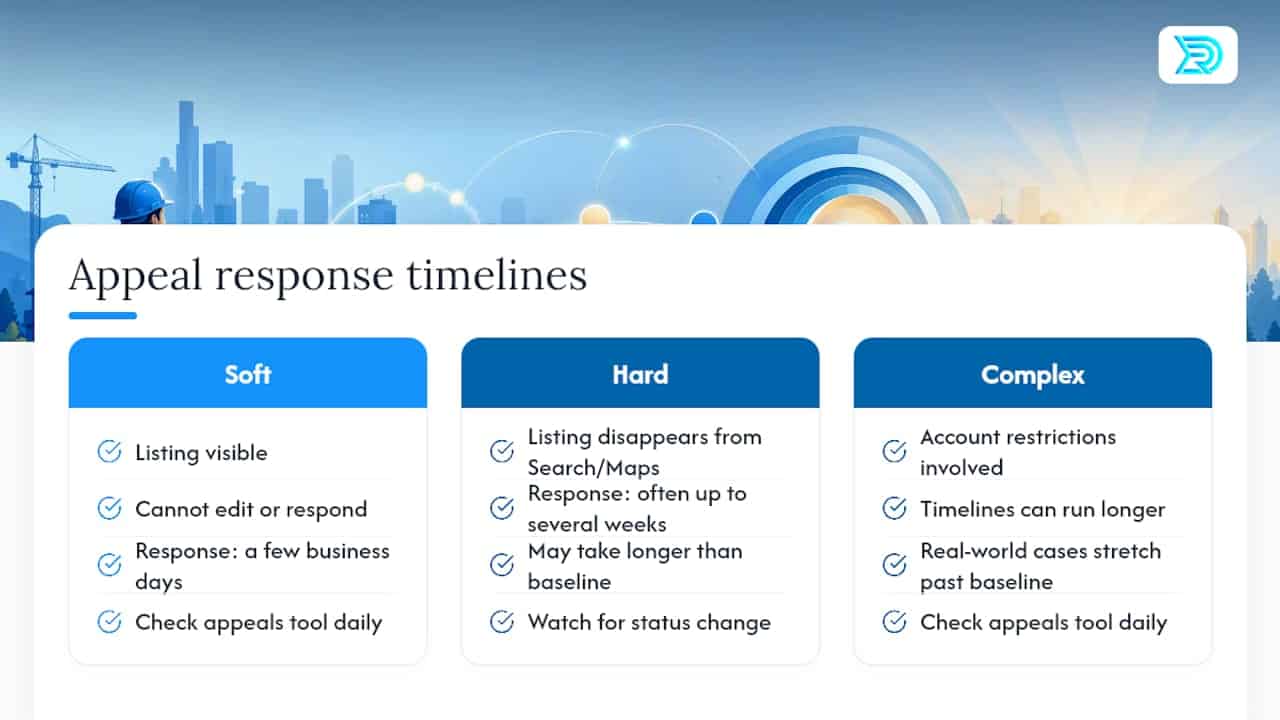
Google states that appeal reviews and decisions generally take up to several business days once submitted through the official appeals tool, though real-world timelines for contractor profiles often stretch past that baseline depending on suspension type.

If reinstated, your reviews and photos typically reappear as they were. Check the appeals status tool daily rather than resubmitting, and watch for a status change before assuming you’ve been denied.
Your Appeal Got Denied: What Now?
- Read the denial reason line by line. Google often states the exact gap, whether it’s an outdated document, an address format mismatch, or missing signage in your photos.
- Fix that specific issue rather than resubmitting the same evidence with a different cover note.
- Wait several business days after making corrections, then resubmit with new evidence you hadn’t previously attached, not a repeat of the original packet.
- Escalate if you’re stuck. The Google Business Profile community’s Product Experts can review complex cases, and once your documentation is genuinely complete, specialist help can move faster than another solo attempt.
Keep Your Profile Compliant So This Doesn’t Happen Again
Prevention costs a fraction of what reinstatement costs in lost leads. Build these habits into your quarterly routine:
- Use your exact legal business name everywhere, with no added keywords or locations.
- Keep your name, address, and phone number identical across your website, your local citation profiles, and every directory listing.
- Restrict Owner and Manager access to business-domain emails only, and audit that list twice a year.
- Avoid review solicitation schemes, sudden bulk edits to your profile, incorrect categories, and any address that doesn’t match your actual operation. Google’s negative review policy explains how manipulation attempts can trigger the same enforcement as a fake listing.
Pro Tip: Set a recurring calendar reminder to check your profile against your Google Account’s standing every 90 days. Most cascading suspensions trace back to an access issue nobody caught for months.
How a Specialist Agency Handles Reinstatement for Contractors
Resultsdigitalus audits access, documentation, and category settings before touching the appeals tool, because filing blind is how appeals get denied twice. A contractor with one flagged listing and clean records can often handle the appeal alone. A contractor with account restrictions, duplicate listings, or a denied appeal already on record benefits from a specialist who’s filed enough of these to spot the exact gap Google’s reviewers are looking for, then follow up daily so lost leads don’t pile up while the listing sits dark.
— Results
Get Your Profile Back and Protect It Going Forward
Resultsdigitalus handles the full reinstatement sequence for roofing, siding, gutter, and general contractors: diagnosing the exact trigger, assembling the right evidence packet, filing the appeal correctly the first time, and following up until your listing is live again. Because Resultsdigitalus works with only one company per trade per market, the strategy built for your reinstatement stays focused on your visibility, not split across your competitors down the street.

If your listing is suspended right now, every day it’s down is a day of storm-damage and repair searches going to someone else’s crews. Request a profile audit and SEO review and get a straight answer on what’s broken and what it takes to fix it.
Where to Verify These Suspension and Appeal Rules
For the appeals tool itself and the 60-minute evidence rule, see Fix suspended or disabled profiles. For naming, address, and content policy triggers, see Google’s Business Profile guidelines.
Sources
- Fix suspended or disabled profiles – Google Business Profile Help
- Google Business Profile guidelines – Google Business Profile Help
