
A contractor market territory strategy is the plan you use to allocate marketing, sales, and operations resources by micro-geography — zip code, drive-time radius, or service cluster — so each crew or market zone receives profitable, sustainable demand. Stop spreading your ad budget across every zip you’ve ever touched. Here’s what to do first:
- Map last 12 months of revenue by zip. Export your invoices or project records and pivot by zip code to reveal which zones pay well, which are secondary, and which are bleeding your margins.
- Reweight proactive marketing spend. Concentrate paid ads and local SEO toward your primary zips. Pause targeted spend in bleeders entirely.
- Integrate results into your CRM and dispatch rules. Inbound lead prioritization should follow the map, not whoever answers the phone first.
Table of Contents
- Why does territory strategy change your profitability and ad ROI?
- What are zip-code tiers, and why does equal territory design fail?
- What data and tools do you need to run this strategy?
- How do you roll out a territory strategy in 90 days?
- How do you keep territory strategy working as a living process?
- What mistakes kill a territory strategy before it starts?
- How do you communicate territory changes to your crews and sales team?
- Key Takeaways
- The territory strategy most contractors skip
- Ready to put your territory data to work?
Why does territory strategy change your profitability and ad ROI?
Territory strategy raises ROI by concentrating spend where historical data shows profit. That’s the Pareto effect applied to geography: A small number of zip codes often generate 50%–70% of a contractor’s total revenue. When you scatter ad dollars across 40 zips to “cover the market,” you dilute spend in the zones that actually convert and subsidize the ones that don’t.
Here’s a concrete example. A roofing company prioritizing three primary zips cuts average drive time per job, fits more jobs per crew per day, and lowers cost per lead (CPL) because their Google Ads geo-targeting and local SEO landing pages concentrate impressions where buyers already trust them. Territory strategy also protects margins when you scale. Adding a fourth crew without a territory plan means that crew cannibalizes your existing routes instead of opening new demand.
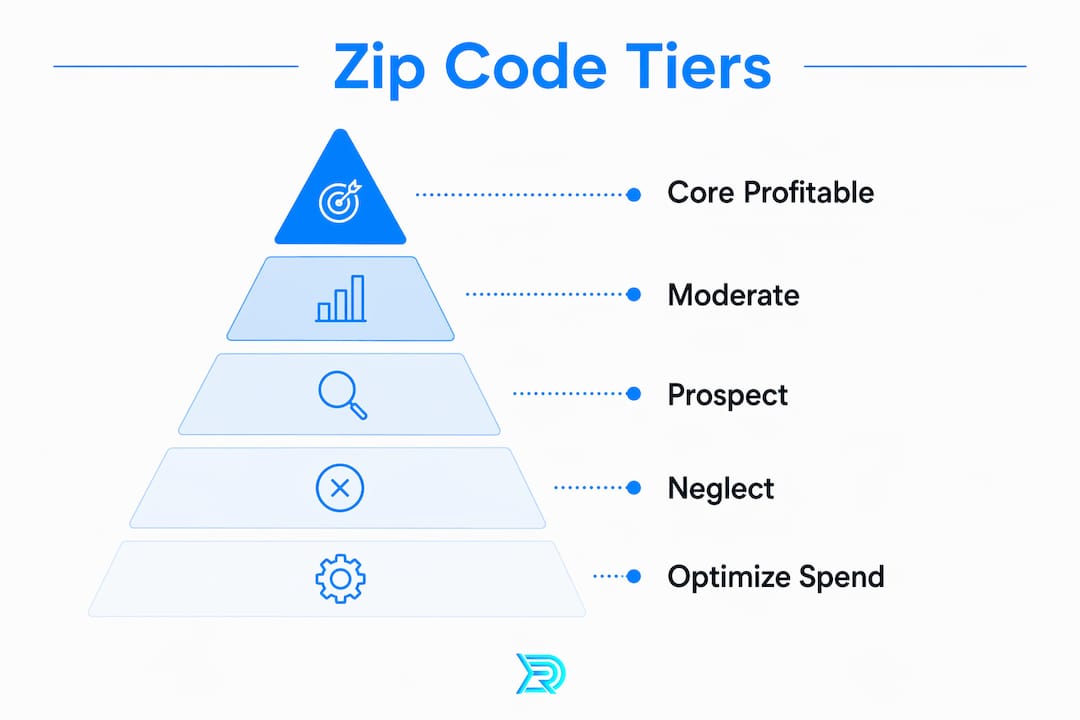
What are zip-code tiers, and why does equal territory design fail?
Treat territories as revenue products, not equal shapes. Two zones of identical square mileage can have wildly different revenue ceilings based on population density, median home age, and drive time.

The equitable territory model distributes comparable earning potential per operator, not identical geography. Here’s how the three tiers break down:
| Tier | Definition | What to do |
|---|---|---|
| Pays well | Core profitable clusters; high close rate, strong avg job value | Concentrate marketing investment here |
| Secondary | Moderate margin; worth maintaining but not scaling | Normal operations, no extra spend |
| Bleeding | Repeat low-margin, high-cost jobs; long drives, low conversion | Stop proactive investment immediately |
Equal vs. equitable design in practice: Two territories covering the same square miles look balanced on paper. But if Territory A has dense suburban neighborhoods with aging roofs and Territory B is rural with long drives between stops, Territory A’s revenue ceiling is three times higher. Designing by square miles instead of drive-time boundaries leaves money on the table and burns out crews in the wrong zone.
Pro Tip: Start by designing for comparable profit per crew, then pull in your dispatch data to confirm the routing is workable. A territory that looks balanced on a map can collapse operationally when peak-hour traffic is factored in.
What data and tools do you need to run this strategy?
The essential inputs are revenue by zip, lead source and quality, drive-time data, and crew routing history. Without those four, you’re flying blind.
Data sources to pull first:
- Invoice or project exports (your accounting or job management software)
- Lead logs by source and zip from your CRM
- Google Business Profile insights (impressions and direction requests by area)
- Google Ads and Meta Ads geography reports
- Dispatch logs showing actual drive time and jobs completed per zone
- Live construction and project data to find territory white space where crews already work but marketing hasn’t followed
Tool categories you need:
- Mapping and territory modeling tools (SiteZeus, SPOTIO) for boundary visualization and overlap detection
- CRM with territory fields to tag leads and jobs by zone
- Google Ads geo-targeting and Meta Ads location audiences set to primary zip clusters
- Route optimization tools to validate that territory borders match real-world routing
- Localized landing pages by zip aligned to your Google Business Profile service area settings
Sync territory boundaries to your CRM and ad audience settings. That integration is what enforces prioritization across every channel simultaneously, rather than having your ads target one area while dispatch sends crews somewhere else.
How do you roll out a territory strategy in 90 days?
Run a 90-day pilot focused on three primary zips, measure CPL and crew utilization, then scale if benchmarks are met.
- Week 0: Data export and mapping. Export 12 months of projects and leads. Pivot by zip. Classify every zip into pays-well, secondary, or bleeder. This mapping exercise typically takes 45–180 minutes depending on how clean your records are.
- Weeks 1–4: Launch targeted ads. Concentrate Google Ads and local SEO toward your three primary zips. Update Google Business Profile service area to reflect realistic drive-time limits, not aspirational coverage.
- Weeks 5–8: Measure and optimize. Pull CPL, quote-to-book conversion rate, average job value, jobs per crew per day, and travel time per job. Adjust ad creative and bid strategy based on what the data shows.
- Weeks 9–12: Evaluate and expand. If primary zips hit benchmarks, identify the next tier of secondary zips to promote. Reclassify any bleeder that improved. Update CRM dispatch rules to reflect the new map.
Sample KPIs for your pilot:
- Cost per lead (CPL) by zip
- Quote-to-book conversion rate
- Average job value by zone
- Jobs per crew per day
- Travel time per job
Pro Tip: Launch paid search plus localized landing pages for your three primary zips at the same time. Paid search gives you immediate, testable signals within days; local SEO compounds those gains over the full 90-day window.
How do you keep territory strategy working as a living process?
Territory strategy must be monitored continuously. Set weekly operational checks and quarterly territory reviews, or the map goes stale within a season.
Primary KPIs to track weekly:
- CPL by zip vs. baseline
- Quote-to-book conversion rate by zone
- Revenue concentration (are 3–5 zips still producing 50%–70% of revenue?)
- Crew utilization rate by territory
Secondary metrics to review quarterly:
- Average job value trend by zip
- Lead response time by zone
- New zip performance vs. secondary tier benchmarks
Set alert rules so the strategy responds automatically. If CPL in a primary zip rises 30% above baseline, pause and revise ad creative before the spend compounds. If a zip drops below your conversion threshold for two consecutive months, reclassify it to secondary and pull proactive spend.
Integrating CRM and field tools into a single view of routes, sales boundaries, and job history is what makes this continuous rather than a one-time exercise. 83% of elite-performing field sales teams use digital territory tools versus 57% of lower-performing teams — the visibility gap is that wide.
| Benchmark | Target |
|---|---|
| Revenue concentration | 3–5 zip codes produce 50%–70% of total revenue |
| Elite team tool adoption | 83% of top-performing teams use digital territory tools |
What mistakes kill a territory strategy before it starts?
Avoid making territory changes based on guesswork or one-off spikes. Use at least 12 months of sustained data and get field input before redrawing any boundary.
Key pitfalls:
- Designing by square miles instead of drive time and demand density
- Ignoring dispatch realities when drawing borders
- Over-claiming service area in Google Business Profile, which dilutes local ranking signals
- Skipping frontline consultation, which creates crew resistance and routing conflicts
Pre-change checklist for managers:
- 12 months of clean revenue and lead data by zip
- CRM configured with territory fields
- Routing check confirming borders are operationally workable
- Frontline team briefed and consulted before rollout
One legal and ethical note: confirm that any exclusive territory agreements with suppliers or franchise partners are respected when you redraw boundaries, and avoid any targeting decisions that could constitute discriminatory service denial under fair housing or civil rights standards. Fold both checks into your rollout checklist before you go live.
Pro Tip: The most common contractor digital marketing mistake is claiming a service area far larger than crews can profitably serve. Tighten your GBP service area to your primary zips and watch local ranking improve.
How do you communicate territory changes to your crews and sales team?
Frontline involvement before a rollout is the single biggest factor in whether a territory change sticks or creates chaos. Crews who learn about new boundaries on the day they take effect will resist them. Crews who helped shape them will defend them.
Brief your dispatch team and lead crews at least two weeks before any boundary change. Walk them through the data: show which zips are paying well and which are bleeding, and explain why the new map reflects where the work actually is. Use scenario modeling to answer routing questions before they become complaints in the field. Tie territory changes to budget management conversations so crews understand the cost of inefficient routing, not just the geography.
For sales teams, connect territory assignments directly to their lead flow and conversion targets. When a rep can see that their primary zips produce the majority of closeable leads, the new boundaries feel like an advantage, not a restriction.
Key Takeaways
A territory strategy built on zip-code data, equitable design, and CRM integration is the fastest path from scattered ad spend to predictable, profitable crew utilization.
| Point | Details |
|---|---|
| Map revenue by zip first | Export 12 months of projects and classify every zip as pays-well, secondary, or bleeder before spending a dollar. |
| Design for earning potential, not equal size | Two same-sized zones can have vastly different revenue ceilings based on density and drive time. |
| Reweight paid and organic spend | Concentrate Google Ads and local SEO on primary zips; pause proactive spend in bleeders immediately. |
| Run a 90-day pilot with clear KPIs | Track CPL, quote-to-book rate, jobs per crew per day, and travel time across your three primary zips. |
| Resultsdigitalus for territory-aware marketing | Resultsdigitalus maps primary zips, builds localized landing pages, and runs geo-targeted ads exclusively for your trade in your market. |
The territory strategy most contractors skip
Most roofing and exterior contractors think about territory as a service-area checkbox on Google Business Profile. That’s not a strategy. It’s a default setting.
What we see repeatedly at Resultsdigitalus is that the contractors who grow fastest aren’t the ones with the biggest service areas. They’re the ones who know exactly which three to five zip codes produce 50%–70% of their revenue and build every marketing decision around protecting and deepening that concentration. The Florida roofing company we helped grow from 3 crews to 18 before selling for $60 million didn’t get there by chasing every lead in a 60-mile radius. They got there by dominating specific markets, then expanding deliberately.
Resultsdigitalus operationalizes this through exclusive market assignments — one roofing company, one siding company, one gutter company per market. Every campaign we build is geo-targeted to primary zips, every landing page is localized to the neighborhoods that convert, and every CRM tag reflects the territory map. That’s not a generic agency approach. That’s contractor-specific exclusivity built into the strategy from day one.
Ready to put your territory data to work?
Resultsdigitalus builds territory-aware digital marketing for contractors across the United States, covering roofing, siding, gutter, and general contracting. The work starts with your zip-code data: we map your primary zones, build localized landing pages, configure geo-targeted Google Ads campaigns, and tag your CRM so every lead routes to the right crew in the right territory. One client per trade per market. No long-term contracts.

The Florida roofing company that grew from 3 crews to 18 and sold for $60 million started with exactly this kind of territory-first approach. If you want to know which zips are worth your next dollar, schedule a diagnostics call with Resultsdigitalus and we’ll show you where your market is actually concentrated.
