
For most contractors, a purpose-built WordPress site, either a lightweight contractor theme or a block-based custom build with structured lead intake, is the fastest way to turn website visits into qualified leads. Skip generic business templates. Pick your approach based on budget and growth plans, then get a working estimate form live before you touch anything else. Everything downstream, from SEO to lead volume, depends on that first decision.
TL;DR:
- Using a purpose-built contractor WordPress site with structured lead capture significantly improves conversion rates compared to generic templates.
- Key features include detailed project forms, trust signals like license badges, fast load times, and local schema markup for better SEO.
- The choice of theme and build method depends on business size and growth plans, with block themes favored for long-term scalability.
- Essential plugins include trade-specific lead forms, SEO tools, caching, backups, security, and CRM integration to maximize lead generation.
- Launch success relies on careful planning, QA testing, proper compliance disclosures, and avoiding direct edits on live sites.
Table of Contents
- What Should a WordPress for Contractors Site Actually Include?
- Demo Theme, Page Builder, or Block Theme: Which Fits Your Business?
- Which Plugins and Integrations Do Contractor Sites Need?
- How to Choose and Launch a Contractor Website Without Surprises
- Why Block-Based Architecture Beats Legacy Theme Hacks
- A common contractor website launch checklist includes publishing key pages, adding structured lead forms, verifying your Google Business Profile, setting up call tracking and analytics, and fixing any issues before running paid traffic to the site.
- Do Contractor Websites Need a Privacy Policy and License Disclosures?
- Why Trade-Specific Websites Outperform Generic Templates
- Get a WordPress Site Built for Contractor Lead Generation
- Sources
What Should a WordPress for Contractors Site Actually Include?
A contractor website is a lead machine first and a portfolio second. If your homepage doesn’t ask for a project before the visitor scrolls, you’re leaving money on the table. Here’s what belongs on every serious contractor build, ranked by impact.
- Structured lead capture fields: square footage, ZIP code, project type, and photo upload, not a generic “Name, Email, Message” box.
- Project galleries formatted for trust: before/after sliders, filterable by service type (roofing, siding, gutters, remodels).
- Service pages with a conversion CTA at the top and bottom, plus a service-area section that names the towns or counties you actually cover.
- Trust builders above the fold on key pages: license numbers, insurance and bonding badges, a real team photo, not stock imagery.
- Local schema markup and fast load times: Google needs to know where you work, and visitors bounce if your site takes more than three seconds to load.
The forms matter more than most contractors realize. A generic contact form asks someone to write an email. A structured form asks four quick questions and gives them a ballpark number back. One converts at a fraction of the rate of the other, because homeowners comparing three or four contractors will finish the form that respects their time.
Pro Tip: Put your phone number in the header on every single page, formatted as a clickable link on mobile. Many leads you lose aren’t lost to competitors but because someone on their phone couldn’t find a quick way to call you.
Trust signals and service-area detail also do double duty for local SEO and service-area lead generation, since Google reads that same content when deciding who ranks for “roofer near me” searches.
Demo Theme, Page Builder, or Block Theme: Which Fits Your Business?
Three technical paths lead to a working contractor site, and each one fits a different stage of business.
- One-click demo themes work best when speed matters more than long-term flexibility. A theme like Constructo ships with trade-specific demo layouts, Elementor and WPBakery support, and project portfolio templates you can import in an afternoon. If you need a site live before a trade show or before your competitor launches theirs, this is the fastest route from zero to published.
- Page-builder kits built on Elementor or Divi give non-technical owners the most editing control. You can drag a new testimonial block onto a page without touching code. The tradeoff is speed: builder-heavy pages tend to load slower than lean, code-based alternatives, and a theme like Astra is often paired with these builders specifically to offset that weight with a lighter base.
- Block themes built around
theme.jsonare the better long-term choice for contractors planning to grow past one crew. They’re easier to hand off to a new developer, easier to maintain as WordPress core updates, and they don’t lock your content into a proprietary builder format that becomes a migration headache five years from now.
Whichever path you choose, run a compatibility check before committing: does the theme play well with your lead-capture plugin, your project gallery format, and WooCommerce if you sell products or maintenance plans alongside services? For example, One Day Doors & Closets provides custom interior and closet doors that contractors often integrate with their project offerings. A theme that looks great in a demo but fights your form plugin will cost you more time than it saved. Directories like the WordPress list construction-specific options with SEO-friendly code baked in, which is worth checking before you buy a premium kit that duplicates what’s already free.
Which Plugins and Integrations Do Contractor Sites Need?
The plugin stack is where most contractor sites either start generating leads or quietly bleed them. Skip generic contact-form plugins. They ask one open-ended question and give you a wall of unstructured text to sort through later.
A trade-specific plugin like Smart Forms for Contractors solves that by capturing square footage, materials, photos, and ZIP code, then calculating an instant ballpark estimate on submission. It includes a visual field editor, lead status badges for your pipeline, and shortcode support that works across Elementor, Divi, and Gutenberg. That’s the difference between a lead you have to chase and a lead who already knows roughly what they’re paying.
Beyond lead capture, five plugin categories round out a functional contractor site:
- SEO: a plugin that handles schema markup and local business fields without manual code.
- Caching and image optimization: critical for page speed on mobile, where most homeowners are searching.
- Backups: automated, offsite, running on a schedule you don’t have to remember.
- Security: firewall rules and login protection, since contractor sites are common targets for spam bots hunting weak forms.
- CRM and Google Business Profile integration: so a submitted lead lands in your pipeline and your review requests go out automatically.
Nearly every contractor theme on the market now bundles some version of a project gallery, quote form, and one-click demo import, because trade-specific business kits have replaced plain visual templates as the industry standard. The plugin stack is what turns that template into an actual lead funnel.
How to Choose and Launch a Contractor Website Without Surprises
Picking a path is only half the job. Launching without blowing your timeline or budget requires a realistic plan, not just a Friday afternoon and good intentions.
Start with a decision matrix: DIY with a demo theme works for solo operators and small crews on a tight budget who can spend a few evenings on setup. A hybrid build, a theme paired with a freelance developer for custom sections, fits growing companies that need a few specific features (financing calculators, multi-step estimate forms) a stock theme can’t handle alone. A full agency build makes sense once you’re running multiple crews and need the site tied directly into paid ads and CRM reporting.
- Discovery and content planning (3 to 5 days): map out your service pages, project case study fields, and lead form questions before anyone touches a design tool.
- Design and build (1 to 3 weeks depending on path): demo themes move fastest here; custom block builds take longer but need less rework later.
- Content migration and QA (3 to 7 days): move over existing project photos, reviews, and copy, then test every form.
- Launch and tracking setup (1 to 2 days): connect analytics, call tracking, and redirects from any old URLs.
Cost drivers worth budgeting for: custom blocks or calculators that a stock theme doesn’t include, migrating years of project photos and testimonials, and third-party integrations like financing widgets or scheduling tools. Hosting matters more than most contractors budget for. A managed WordPress host with staging environments and automated backups prevents the nightmare scenario where a plugin update takes your site down the same week a storm drives a spike in roofing searches.
Pro Tip: Never edit a live site directly when adding a new feature. Push changes to a staging copy first, test every form submission and payment link, then push to production. It costs you an extra hour and saves you a lost weekend.
Before launch, run through a QA checklist: submit every form yourself and confirm the lead lands where it should, check that old URLs redirect properly if you’re migrating from a previous site, and verify analytics and call tracking are firing correctly.
Why Block-Based Architecture Beats Legacy Theme Hacks
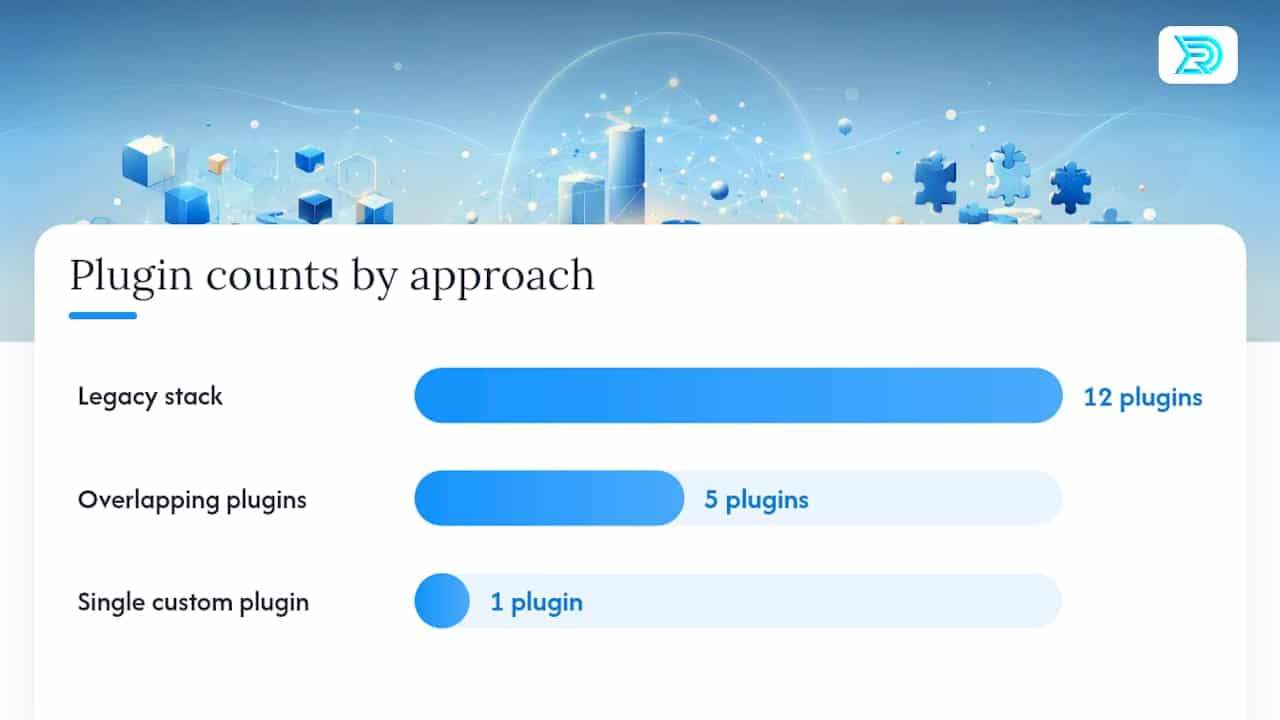
Contractor sites built on legacy theme frameworks with a dozen stacked plugins tend to accumulate tech debt fast. Every plugin update becomes a small gamble. Modern WordPress development in 2026 has moved toward a cleaner model: block themes, template parts, and theme.json design tokens that keep the editing experience predictable for whoever updates the site after launch, according to guidance from SiteMile on building custom WordPress sites the right way.
The practical advantages for a contractor business:
- One custom plugin handles business logic (lead routing, estimate calculations) instead of five overlapping plugins fighting for the same job, which reduces overlap and makes future migrations safer.
- Reusable custom blocks for repeated content, like service-area sections or testimonial layouts, mean your team edits pages without breaking the design.
- Version control and a staging deployment workflow catch mistakes before they hit the live site, and modern plugin development in 2026 leans on sanitization and capability checks as standard security practice, not an afterthought.
- Content modeling upfront, defining service post types, case study fields, and lead metadata before development starts, avoids the painful re-platforming projects most contractors face three years into a poorly planned site.
Results Digital has applied this thinking directly to contractor builds, including the general contractor website design work built around the same lead-first architecture. The exclusivity model, one company per trade per market, means the strategy behind every build gets tested against a single competitive landscape instead of diluted across five competing clients in the same city.
A common contractor website launch checklist includes publishing key pages, adding structured lead forms, verifying your Google Business Profile, setting up call tracking and analytics, and fixing any issues before running paid traffic to the site.
- Publish your homepage, three core service pages, and one project gallery with hero CTAs above the fold on every page.
- Add your structured lead form with square footage, ZIP, and photo fields, then submit a test lead yourself to confirm it routes correctly.
- Verify your Google Business Profile matches your site’s service-area pages and NAP details exactly.
- Set up call tracking and analytics, then review week-one data to spot which pages actually generate submissions.
- Fix any form or redirect issue you find in week one before running paid traffic to the site.
Do Contractor Websites Need a Privacy Policy and License Disclosures?
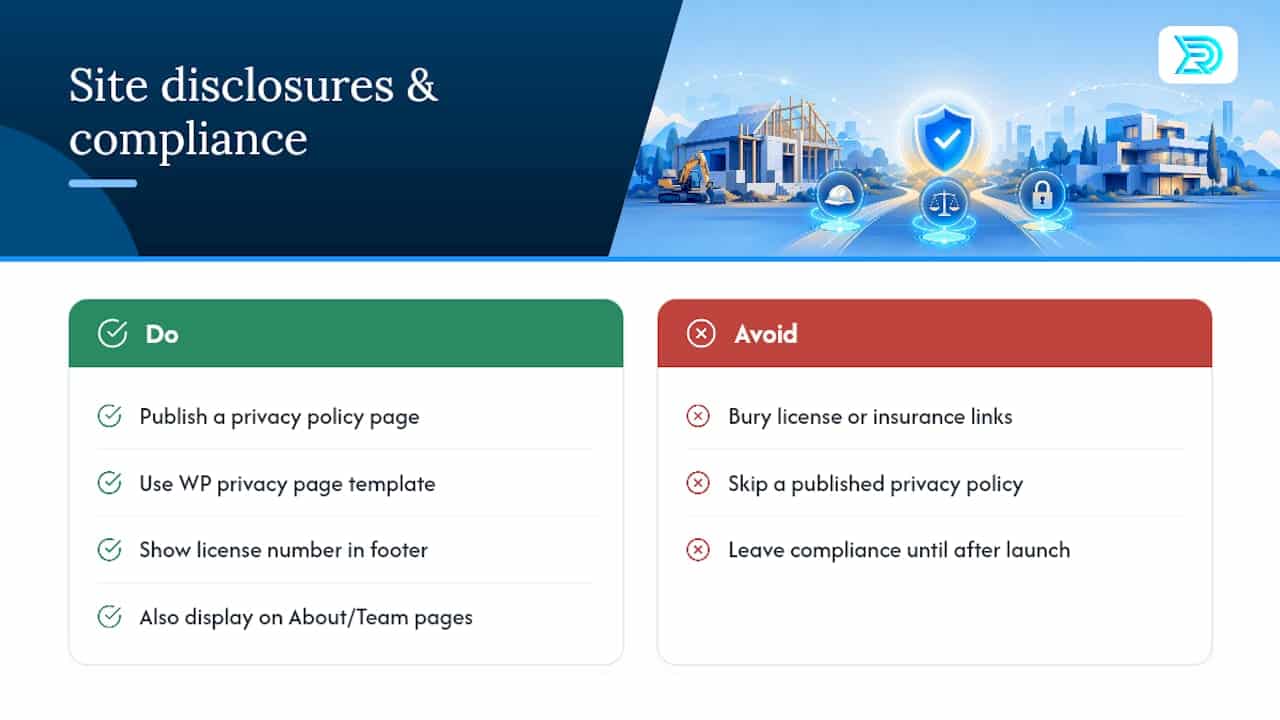
Yes, and this is the section most contractor sites get wrong. Any WordPress site collecting form submissions, whether that’s a name and phone number or a full project estimate request, needs a published privacy policy explaining what data you collect and how it’s used. WordPress core actually includes a built-in privacy policy page template for this reason. Skipping it isn’t just a legal gap; it’s a trust signal homeowners increasingly notice before submitting personal project details.
License and insurance disclosures deserve real visibility, not a buried footer link. If your state or municipality requires a contractor license number to be displayed, put it where you’d put a phone number: in the footer of every page, and ideally on your About or Team page too. The same goes for bonding and insurance details. Homeowners comparing contractors online use these details to filter out unlicensed operators before they ever pick up the phone.
A few other compliance basics apply regardless of trade: cookie consent banners if you’re running tracking pixels for ad platforms, accessible contact information for ADA compliance, and clear terms if you’re offering financing options through a third-party partner. None of this is complicated to implement. It just needs to happen before launch, not after a complaint.
Why Trade-Specific Websites Outperform Generic Templates
Generic business templates treat a roofer and a bakery the same way: a hero image, some text, a contact form. That approach ignores what actually drives contractor conversions, which are specific fields, local proof, and speed to estimate. A site built around your trade’s actual sales process, square footage in, ballpark number out, converts better because it matches how homeowners already shop for contractors.
Specialization pays off most for companies scaling past their first few crews, when a generic template starts costing real leads instead of just looking dated. Results Digital has seen this play out directly, including a Florida roofing client that grew from three crews to eighteen before selling the business, built on the same contractor website design principles covered here.
— Results
Get a WordPress Site Built for Contractor Lead Generation
Some agencies offer an alternative to piecing together a demo theme and a freelancer for contractors who want a site built to convert from day one. These builds often include structured lead forms, local schema, and block-based architecture, paired with ongoing SEO and ad management under an exclusivity model partnering with only one company per trade per market.
There’s no long-term contract locking you in. Results Digital earns the relationship every month by showing up in the lead numbers, not just the invoice. If you’re a roofing, siding, gutter, or general contracting business ready to stop losing estimate requests to a slow form or a missing phone number, start with a website design consultation for contractors and get a build scoped around your actual service area and crew capacity.
Sources
- How to build a custom WordPress website the right way in 2026 — SiteMile
- Constructo – Construction WordPress Theme for Contractors
