
A roofing lead CRM workflow is a structured pipeline that moves every prospect from first contact through signed contract and project completion, with automated follow-ups and task triggers at each stage. Without this structure, you are flying blind. Leads fall through the cracks, follow-ups happen too late, and your close rate suffers for it. Tools like DripJobs, Fuzen, and Systeme.io are built specifically for roofing contractors who need to track roofing leads through a CRM workflow that connects sales directly to field operations. This guide breaks down every stage, every automation, and every decision point you need to build a system that actually works.
What are the essential stages in a track roofing leads CRM workflow?
A roofing CRM pipeline is the backbone of your entire sales operation. It gives every lead a defined position so nothing gets lost, especially during a storm surge when you might be managing over 200 leads simultaneously. That volume is unmanageable without a clearly mapped pipeline.

The standard stages that roofing contractors use look like this:
| Stage | Purpose |
|---|---|
| New Lead | Capture source, contact info, and job type |
| Contacted | Log first outreach attempt and response |
| Inspection Scheduled | Confirm date, time, and rep assigned |
| Inspection Completed | Record findings and damage assessment |
| Proposal Sent | Track quote delivery and follow-up timing |
| Contract Signed | Trigger project kickoff workflow |
| In Progress | Monitor production milestones |
| Completed | Collect payment, request review |
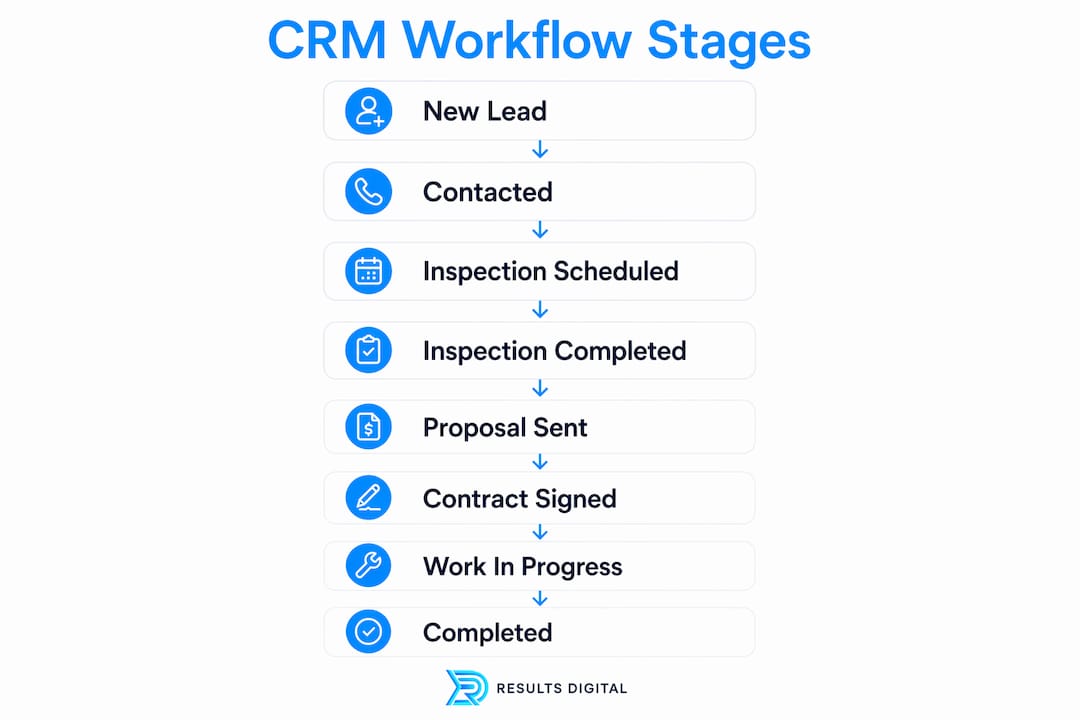
Each stage should have a defined next action attached to it. When a lead moves from Inspection Completed to Proposal Sent, your CRM should automatically schedule a follow-up task for 48 hours later. That removes the mental load from your sales rep and keeps the deal moving.
Insurance jobs require their own pipeline track. Mixing retail and insurance leads in the same pipeline creates confusion around supplements, adjuster meetings, and claim approvals. Separate pipelines for each job type let you tag storm leads, track adjuster status, and monitor supplement submissions without losing visibility on your retail pipeline. Kanban boards work particularly well here because your team can see every lead at a glance, sorted by stage, without digging through a spreadsheet.
Pro Tip: Label insurance leads with the storm event name or date at the point of entry. When you are working a hail event six months later, you will know exactly which leads came from that storm and where they stand.
How does automation improve tracking roofing leads and CRM workflows?
Automation is where roofing lead management shifts from reactive to proactive. The speed of your first response is the single biggest factor in whether a homeowner picks you or your competitor. Automated SMS follow-ups within five minutes of lead capture can increase close rates by up to 47%. That number reflects a simple truth: the first contractor to respond with a clear message wins the appointment.
Here is a proven four-touch follow-up sequence that roofing contractors use to capture jobs that would otherwise go cold:
- Minute 1 to 5: Automated SMS confirming receipt of the inquiry and offering a specific inspection time.
- Day 1: Automated email with your company overview, reviews, and a direct booking link.
- Day 4: Personalized manual text from the sales rep referencing the specific property or storm event.
- Day 10 to 14: Automated email with a limited-time offer or urgency message tied to seasonal demand.
- Day 21: Final manual call from the rep as a last-touch before archiving the lead.
The manual touchpoints in steps three and five are not optional. Personalized manual messages after automated outreach significantly boost homeowner response rates because they signal that a real person is paying attention. Automation handles the volume; the human touch closes the deal.
Beyond follow-ups, automation handles task creation. When a contract is signed, your CRM should automatically generate a project kickoff checklist, assign a production manager, and notify your materials coordinator. This removes data re-entry between your sales and operations teams entirely.
Pro Tip: Set a hard rule in your CRM: no lead sits in the same stage for more than five business days without a logged activity. Build an automated alert that flags stale leads to your sales manager every Monday morning.
What tools and features should roofing contractors look for in a CRM?
Not every CRM is built for roofing. Generic platforms like Salesforce or HubSpot can technically manage leads, but they require expensive custom integrations to handle roof measurements, insurance claims, and production scheduling. Roofing-specific CRM platforms cost 66 to 76 percent less than generic CRMs once you factor in those integration costs. That gap matters when you are running a lean operation.
Here is how roofing-specific CRMs compare to generic options on the features that matter most:
| Feature | Roofing-specific CRM | Generic CRM |
|---|---|---|
| Satellite measurement integration | Built in | Requires paid add-on |
| Insurance claim tracking | Native workflow | Manual workaround |
| Storm lead tagging | Standard feature | Custom field required |
| Mobile field app | Purpose-built | Adapted desktop version |
| Production scheduling | Integrated | Separate tool needed |
| Pricing | Lower total cost | Higher with integrations |
Beyond the feature list, mobile-first CRM design is non-negotiable for field reps. Your sales team is on rooftops and driveways, not at a desk. They need to log a lead, send a quote, and update a pipeline stage from a phone in under two minutes. If the mobile experience is clunky, your reps will stop using the CRM within 30 days.
Other features worth prioritizing:
- Real-time pipeline visibility so your sales manager can see every rep’s activity without a weekly meeting
- Proposal generation tied directly to measurement data to eliminate manual quoting errors
- Workflow flexibility to handle both insurance and retail jobs without forcing them into the same process
- Seasonal billing options so your CRM cost scales with your revenue during slow winter months
DripJobs and Fuzen both offer roofing-specific workflows that address storm lead surges and insurance claim tracking natively. If you are evaluating platforms, start there before looking at general-purpose tools.
How to implement a roofing CRM workflow that sticks
Most roofing contractors who fail with a CRM do not fail because of the software. They fail because they never built a proper implementation plan. Here is a step-by-step process that works:
- Start with a roofing template. Most roofing-specific CRMs include pre-built pipeline templates. Use them. Customize stage names to match your terminology, but do not rebuild from scratch.
- Separate your pipelines. Create one pipeline for retail jobs and a second for insurance jobs. Separate insurance workflow stages reduce confusion and prevent revenue leakage from missed supplements.
- Configure your automation sequences. Set up your five-minute SMS trigger, your four-touch follow-up sequence, and your contract-signed kickoff workflow before you enter a single lead.
- Train your team on one workflow at a time. Start with lead entry and the first two pipeline stages. Add complexity after the team is comfortable with the basics.
- Choose software your team will actually use. Many contractors abandon CRMs that require extensive training. Prioritize an intuitive interface over a long feature list.
- Track four key metrics from day one: inspection-to-proposal time, proposal-to-close rate, follow-up compliance rate, and average days per pipeline stage.
The metrics in step six tell you exactly where your pipeline is leaking. If your inspection-to-proposal time is longer than 48 hours, you are losing jobs to faster competitors. If your follow-up compliance rate is below 80 percent, your automation sequences need adjustment or your reps need accountability.
Linking your sales pipeline directly to project delivery is the step most contractors skip. Automatically converting signed proposals into project and material workflows doubles operational efficiency by eliminating the handoff gap between your sales team and your production crew. That connection is what separates a CRM from a glorified contact list.
You should also build your roofing lead generation strategy to feed directly into your CRM pipeline. Every lead source, whether Google Ads, door-knocking, or referrals, should enter the same pipeline at the New Lead stage with the source tagged. That data tells you which marketing channels produce the highest close rates, not just the most leads.
Key takeaways
A roofing CRM workflow converts more leads when it combines clearly defined pipeline stages, automated follow-up sequences, and a direct connection between sales and project delivery.
| Point | Details |
|---|---|
| Pipeline stages matter | Eight defined stages from New Lead to Completed keep every deal visible and moving. |
| Separate insurance and retail | Distinct pipelines prevent supplement delays and protect claim revenue. |
| Automate the first five minutes | Automated SMS within five minutes of lead capture can increase close rates by up to 47%. |
| Mobile usability drives adoption | Field reps need a purpose-built mobile app or they will stop using the CRM. |
| Metrics reveal pipeline leaks | Track inspection-to-proposal time and follow-up compliance rate to find and fix weak spots. |
What I have learned from watching roofing contractors build CRM workflows
After working with roofing contractors across the country at Resultsdigitalus, the pattern is consistent. The contractors who get the most out of their CRM are not the ones with the most features turned on. They are the ones who built a simple, disciplined workflow and trained their team to follow it without exception.
The biggest mistake I see is treating the CRM as a sales tool only. The moment a contract is signed, most contractors mentally exit the CRM and switch to phone calls and text threads to manage production. That gap is where jobs go sideways. Material orders get delayed, crews show up without the right information, and the homeowner experience suffers. Connecting your sales pipeline to your production workflow is not a nice-to-have. It is the difference between a business that scales and one that stays stuck at the same revenue ceiling.
I also see contractors over-automate early in the process and then wonder why homeowners feel like they are talking to a robot. Automation should handle the logistics. A real person should handle the relationship. The four-touch sequence works because it mixes both. Strip out the manual touchpoints and your response rate drops fast.
Generic CRMs are the other trap. I have watched contractors spend months trying to configure Salesforce or HubSpot for roofing workflows, only to abandon the whole system six months later. Roofing has specific operational realities that generic platforms were not designed for. Start with a tool built for your trade, then grow into complexity as your team matures.
— Results
Grow your lead volume to match your CRM capacity
A well-built CRM workflow only performs when you have a steady flow of quality leads feeding into it. At Resultsdigitalus, we build digital marketing systems engineered specifically for roofing contractors, covering SEO, Google Ads, Meta Ads, and roofing website design that converts visitors into pipeline-ready leads. We work with one roofing contractor per market, so your campaigns never compete against another client we manage. If your CRM is ready but your lead volume is not, that is exactly the problem we solve.
FAQ
What is a roofing CRM workflow?
A roofing CRM workflow is a structured pipeline that tracks every lead from first contact through project completion, with automated follow-ups and task triggers assigned to each stage. It connects your sales process directly to your field operations to reduce manual errors and lost opportunities.
How many pipeline stages does a roofing CRM need?
Most roofing contractors use eight core stages: New Lead, Contacted, Inspection Scheduled, Inspection Completed, Proposal Sent, Contract Signed, In Progress, and Completed. Insurance jobs benefit from a separate pipeline to track adjuster meetings and supplement submissions without disrupting the retail workflow.
Why do roofing-specific CRMs outperform generic platforms?
Roofing-specific CRMs include built-in features like satellite measurement integration, insurance claim tracking, and storm lead tagging that generic platforms require expensive add-ons to replicate. The total cost of a generic CRM with necessary integrations runs 66 to 76 percent higher than a purpose-built roofing solution.
How fast should automated follow-ups go out after a new lead comes in?
Automated SMS follow-ups should go out within five minutes of lead capture. Speed is the primary conversion factor in roofing sales, and a five-minute response window dramatically outperforms the industry average of several hours.
What metrics should I track in my roofing CRM?
Track inspection-to-proposal time, proposal-to-close rate, follow-up compliance rate, and average days per pipeline stage. These four numbers tell you exactly where leads are stalling and which part of your sales process needs attention.
