
A roofing service area page is a dedicated webpage targeting a specific service-plus-location query with unique, locally relevant content designed to rank in local search results and connect your business with customers across multiple cities. Unlike a generic contact page or a homepage, a service area page (commonly called an SAP in local SEO) earns its place in Google’s index by proving genuine geographic knowledge. Google’s 2026 helpful content classifier evaluates these pages for unique local signals like NOAA hail event data, local roofing material prevalence, and insurance carrier activity. Roofing contractors who understand this distinction build pages that rank. Those who do not build pages that get penalized.
What is a roofing service area page and how does it work?
A roofing service area page is a standalone URL built around one service in one city or zip code. The page answers a specific local search query, such as “roof replacement in Katy, TX” or “storm damage repair in Alpharetta, GA.” It is not a location page. The difference matters for both SEO and customer experience.
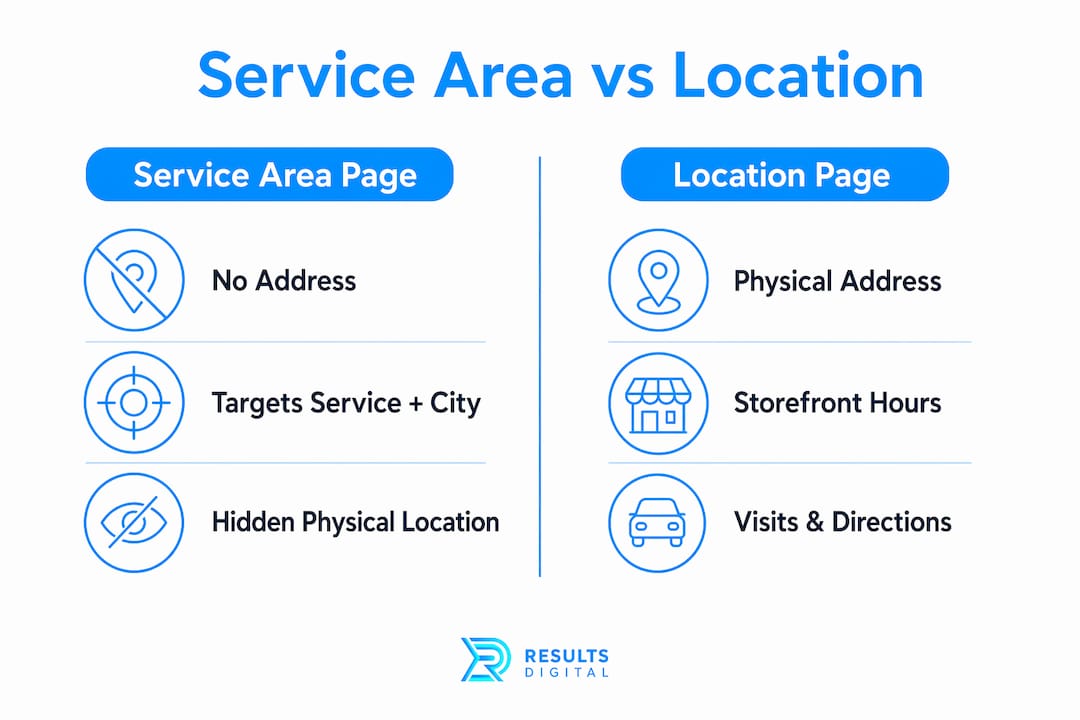
Service area pages target markets where a roofing business operates without a physical storefront. A location page, by contrast, targets a physical address where customers can walk in. Most roofing companies are service area businesses (SABs). They drive to the customer, not the other way around. That operational reality shapes every SEO decision you make.

Google Business Profile treats SABs differently from storefronts. SABs do not display a public address. Instead, they define their territory through cities, counties, or zip codes listed in their profile. Your service area pages on your website should mirror that same geographic logic. Consistency between your Google Business Profile and your website signals legitimacy to Google.
The table below shows the core differences between the two page types.
| Feature | Service area page | Location page |
|---|---|---|
| Physical address displayed | No | Yes |
| Targets | Cities or zip codes served | Storefront address |
| Best for | Mobile roofing crews | Offices or showrooms |
| Google Business Profile type | Service area business | Storefront business |
| Content focus | Local roofing needs and service info | Hours, directions, on-site services |
What makes a roofing service area page effective in 2026?
Generic pages get penalized. Google’s helpful content standards are explicit: pages must prioritize human visitors and avoid “disposable” content. Swapping a city name into a template is the fastest way to earn a deindex. Effective pages go deeper.
Here is what a high-quality roofing service area page includes:
- Localized climate and storm data. Reference actual weather patterns for that market. A page targeting Tulsa, OK should mention hail frequency and the impact on asphalt shingles. A page for coastal Florida should address salt air corrosion and wind uplift ratings.
- Neighborhood-level roofing material context. Older suburbs often have aging three-tab shingles. Newer developments may use architectural shingles or metal roofing. Name the materials common in that specific area.
- Real project photos with local attribution. A photo of a completed roof replacement in Sugar Land, TX carries more trust than a stock image. Add metadata and captions that reference the city and neighborhood.
- Insurance and carrier information. Homeowners in hail-prone markets like Dallas or Denver want to know you understand the claims process. Name the carriers active in that market and explain how you work with adjusters.
- LocalBusiness schema with AreaServed. Schema markup helps pages inherit authority and rank without a physical storefront. Use Service schema for each roofing service and FAQPage schema to capture featured snippet positions.
- Internal links to parent service pages and your homepage. Internal linking distributes page authority and helps users move between local and global information on your site.
Doorway pages are the opposite of this. A doorway page exists only to funnel traffic and offers no real value to the visitor. Google penalizes them. The test is simple: if you removed the city name, would the page still be useful? If yes, you have a doorway page. If no, you have a real service area page.
Pro Tip: Before publishing any service area page, ask yourself whether a homeowner in that city would find the page genuinely helpful. If the answer is no, rewrite it before it goes live.
What types of roofing service area pages should you build?
Not every roofing service gets its own page in every city. The goal is a market-first strategy, not a content factory. Building too many generic pages by swapping city names leads to penalties. Build pages only for markets you are operationally ready to serve well.
Common types of roofing service area pages include:
- Storm damage repair pages. These perform best in hail corridors like the I-70 corridor in Kansas and Colorado or Tornado Alley markets in Texas and Oklahoma.
- Roof replacement pages. Your highest-value service deserves a dedicated page in every primary market you serve.
- Roof inspection pages. These attract homeowners preparing for insurance claims or real estate transactions.
- Gutter installation and repair pages. If you offer gutters, a separate page for each city captures a distinct search intent.
- Emergency roofing pages. Homeowners searching at 11 PM after a storm are high-intent buyers. A page targeting “emergency roof repair in [city]” captures that traffic.
Use this process to decide which pages to build first:
- List every city or zip code you actively serve. Pull this from your job history, not a map radius.
- Identify your top two or three services by revenue. Build those pages first in your highest-volume markets.
- Check local search volume. Use Google Search Console or keyword research tools to confirm demand exists before investing in a page.
- Confirm operational readiness. If you cannot respond to a lead in that city within 24 hours, do not build the page yet.
- Prioritize markets with recent storm activity. NOAA storm reports are public. Use them to identify where demand is spiking right now.
This approach keeps your site architecture clean and your content credible. A roofing company with 15 well-built pages outperforms one with 150 thin pages every time.
How to create and optimize roofing service area pages for local SEO
The process starts before you write a single word. Keyword research defines the exact query each page targets. Use a phrase like “[service] + [city]” as your primary keyword. Every other element on the page supports that phrase.
Follow these content and technical steps:
- Write a unique introduction for each city. Reference something specific to that market: a recent hailstorm, a local neighborhood, or a common roofing issue in that area.
- Include a localized FAQ section. Answer questions like “Does homeowners insurance cover roof damage in city]?” or “What roofing materials work best in [city]’s climate?” [Local SEO specialists confirm that including storm damage history, local roofing challenges, and insurance factors builds credibility and improves rankings.
- Optimize your URL structure. Use a clean format like /roofing/[city] or /[city]-roof-replacement. Avoid long, parameter-heavy URLs.
- Write a unique meta title and meta description. Include the city name and primary service. Keep the meta title under 60 characters.
- Use H1, H2, and H3 headings that include the city name naturally. Do not force the keyword into every heading. One or two mentions in headings is enough.
- Add a clear call to action tied to that location. “Call our [city] roofing team” converts better than a generic “Contact us” button.
- Implement LocalBusiness schema with AreaServed set to that specific city. Pair it with Service schema listing the roofing services offered in that market.
Service area pages act as always-on customer service content, helping users identify reliable local roofing providers and improving local search rankings. That means your pages need to stay current. A page last updated in 2022 signals neglect to both Google and the homeowner reading it.
Pro Tip: Set a quarterly calendar reminder to update each service area page with a new project photo, a recent storm event reference, or updated insurance carrier information. Fresh content signals an active, credible business.
Common mistakes to avoid:
- Duplicate content. If two pages share 80% of the same text, Google treats one as redundant.
- Missing contact information. Every service area page needs a phone number and a contact form specific to that location or region.
- No internal links. Isolated pages do not pass authority. Link each SAP to your main services page and your homepage.
- Shallow word count. A 200-word page cannot compete with a 700-word page packed with local detail. Depth signals expertise.
Key Takeaways
A roofing service area page earns rankings by combining a specific service-plus-location keyword with genuine, locally relevant content that proves geographic knowledge and serves the homeowner first.
| Point | Details |
|---|---|
| Definition and purpose | A service area page targets one service in one city with unique local content, not a generic template. |
| SAP vs. location page | Service area pages serve mobile roofing crews; location pages serve businesses with a physical storefront. |
| Content depth requirement | Include storm data, local materials, real project photos, and insurance context to pass Google’s helpful content test. |
| Schema markup | Use LocalBusiness schema with AreaServed and Service schema to signal legitimacy without a physical address. |
| Market-first strategy | Build pages only for cities you are operationally ready to serve, and update them regularly with fresh local proof. |
The shift I’ve seen in how service area pages actually perform
The roofing contractors we work with at Resultsdigitalus used to ask us to build as many city pages as possible. More pages meant more chances to rank. That logic made sense in 2019. It does not work in 2026.
What I have seen consistently is that quality beats quantity by a wide margin. A single well-built page for a high-demand market like The Woodlands, TX or Scottsdale, AZ outperforms 20 thin pages targeting smaller suburbs. The difference is always the same: local proof. Real photos, real storm references, real insurance context. That content cannot be faked, and Google’s classifier knows the difference.
The other shift worth noting is that service area pages are customer service tools, not just SEO assets. Homeowners land on these pages after a storm, after a leak, after a failed inspection. They are stressed and looking for someone they can trust. A page that speaks directly to their situation, their neighborhood, and their insurance carrier earns the call. A page that just lists services does not.
My honest advice: treat every service area page like a sales rep for that specific city. Give it the information, the credibility, and the local knowledge it needs to close the deal.
— Results
How Resultsdigitalus builds service area pages that actually rank
Resultsdigitalus builds SEO programs for roofers that include market-first service area page strategies, not cookie-cutter city page templates. Every page we create is built around real local data, proper schema markup, and content that passes Google’s helpful content standards.
We helped a Florida roofing company grow from 3 crews to 18 before it sold for $60 million. That growth was built on a local SEO foundation that included well-structured service area pages targeting the right markets at the right time. If you want a local SEO strategy built specifically for your roofing business, Resultsdigitalus works with only one roofing company per market. No long-term contracts. Just results.
FAQ
What is a roofing service area page?
A roofing service area page is a dedicated webpage targeting a specific service-plus-location query with unique, locally relevant content. Its purpose is to help roofing companies rank in local search results for cities or zip codes they serve without a physical storefront.
How is a service area page different from a location page?
A location page targets a physical business address with hours and directions. A service area page targets cities where the business operates without a storefront, which is the standard setup for mobile roofing crews.
What should be on a roofing service area page?
Every roofing service area page needs a unique introduction referencing local conditions, real project photos, storm and climate data, insurance context, a clear call to action, and LocalBusiness schema with AreaServed markup.
How many service area pages should a roofing company have?
Build pages only for markets you are operationally ready to serve. A focused set of well-built pages consistently outperforms a large library of thin, templated pages.
Can duplicate service area pages hurt my rankings?
Yes. Google’s helpful content classifier penalizes pages that swap city names into identical templates. Each page must contain genuinely unique local content to avoid being flagged as a doorway page or deindexed.
