
Your service pages are either working as a lead machine or costing you jobs. Most contractor websites fall into the second category. They look decent, but they’re built like digital brochures instead of conversion tools. The result? Visitors land, browse for 30 seconds, and leave without calling.
How contractor service pages drive leads comes down to a handful of specific elements working together: a clear headline that names the exact service and your target customer, a visible call to action above the fold, social proof placed near that CTA, and a contact path with almost zero friction. Add mobile speed, local SEO with city-specific mentions, and an interactive tool like a cost calculator, and you’ve built a page that captures qualified leads around the clock.
Here’s what a high-performing contractor service page does:
- Opens with a specific headline naming the service and the audience it serves
- Shows a primary CTA above the fold, matched to where the visitor is in their buying decision
- Includes a secondary, lower-friction CTA for visitors still comparing options
- Lists deliverables, scope, and process steps so visitors know exactly what they’re getting
- Places reviews and project photos near the CTA, not buried at the bottom
- Answers common objections in a short FAQ section
- Loads fast on mobile and includes a click-to-call button
- Mentions the city and service area to rank for nearby searches
- Uses a cost calculator or similar tool to trade value for contact information
- Tracks form fills, calls, and conversions so you know what’s working
None of this is complicated. The gap between a page that converts and one that doesn’t is usually clarity and structure, not design budget.
Why most contractor websites fail to generate leads
Traffic isn’t the problem for most contractors. The page is. Contractor websites that lack clear CTAs above the fold, mobile optimization, social proof, and targeted service pages experience significant lead loss even when they’re getting consistent visitors. Here’s where the breakdown typically happens:
- No CTA above the fold. If a visitor has to scroll to find out how to contact you, most won’t bother. The action you want them to take needs to be visible the moment the page loads.
- Slow mobile experience. Homeowners search for contractors on their phones, often at night or on weekends. A page that takes more than three seconds to load on mobile loses that lead before it starts.
- Generic, vague content. “We provide quality roofing services” tells a visitor nothing. If your copy could belong to any contractor in the country, it’s not doing its job.
- Multiple competing CTAs. When a page asks visitors to call, fill out a form, download a guide, and follow on social media all at once, they freeze. One primary action wins.
- No social proof near the ask. Reviews and project photos buried at the bottom of the page don’t help someone who’s deciding whether to fill out your form right now.
- Long or generic contact forms. Asking for 10 fields before you’ve earned any trust kills conversions. Name, phone, and a brief project description is enough to start.
- No local SEO or service area mentions. A page that never mentions the city or region you serve won’t rank for the searches that matter most to your business.
- No tracking or analytics. If you don’t know which pages generate calls and which ones don’t, you’re flying blind. You can’t fix what you can’t measure.
Every one of these is fixable. The key is auditing your current pages before spending more on ads or traffic. Driving more visitors to a broken page just raises your cost per lead.
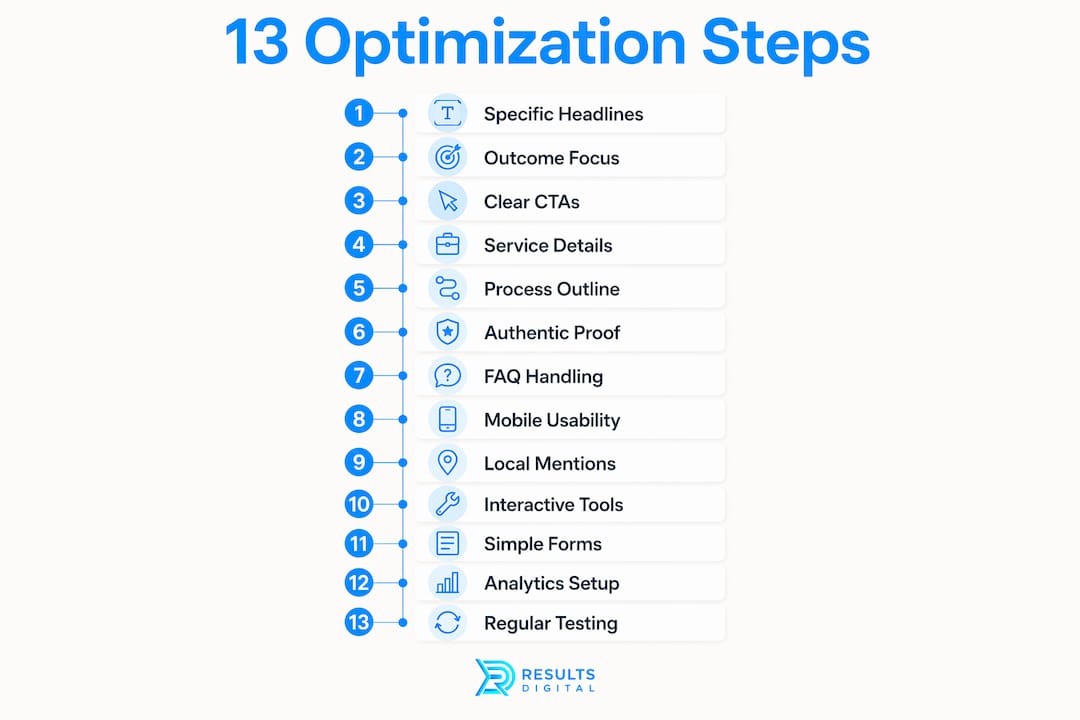
13 fixes to optimize your contractor service pages for more leads
1. Start with a specific, descriptive headline
Your headline needs to confirm in under five seconds that the visitor is in the right place. “Roof Replacement in Austin, TX” beats “Quality Roofing Services” every time. Service pages with clear headlines that name the service and audience convert better and rank higher in search results.

2. Write copy that describes outcomes, not just features
Visitors care about what they get, not what you do. Instead of “We install 50-year architectural shingles,” try “Your new roof comes with a 50-year manufacturer warranty and a written workmanship guarantee.” Describe the project types you handle, the typical timeline, and what the finished result looks like.
3. Add one primary CTA and one secondary CTA
Your primary CTA should push the visitor toward the highest-intent action: “Get Your Free Estimate.” Your secondary CTA gives a lower-commitment option for visitors still researching: “See Our Recent Projects” or “Schedule a 15-Minute Call.” Matching CTAs to buyer readiness is one of the fastest ways to improve lead quality without changing anything else on the page.
4. Detail what’s included in the service
Scope boundaries reduce mismatched inquiries and improve your close rate. List what the service covers, what it doesn’t, any optional add-ons, and the pricing factors that affect the final number. You don’t need to publish exact prices, but visitors who understand the range are better leads than visitors who have no idea what to expect.
5. Outline your process and timeline
A short three-to-four step process section removes anxiety about what happens after someone contacts you. “Step 1: We schedule a free on-site estimate. Step 2: You receive a written proposal within 24 hours.” That kind of clarity sets scope expectations and filters out tire-kickers before they waste your time.
6. Include authentic proof elements
Generic praise doesn’t convert. Specific social proof that references the actual job performed, the city, and the result builds far more trust than “Great company, highly recommend.” Use before-and-after photos, short case snippets with real numbers, and review excerpts that mention the specific service.
7. Add a FAQ section that handles real objections
Think about the questions you hear on every estimate call: “How long will this take?” “Do you handle permits?” “What if I need to reschedule?” Answer those on the page. A well-written FAQ section keeps visitors engaged longer and removes the doubt that stops people from submitting a form.
8. Optimize for mobile speed and usability
Place a click-to-call button in the header and make it sticky on mobile so it’s always visible. Mobile-friendly design and fast load speed are non-optional at this point. Most homeowners searching for a contractor are doing it from a phone, and a slow or broken mobile experience sends them straight to the next result.
9. Add city and service area mentions throughout
Every service page should name the cities and counties you serve, not just in the footer but in the body copy, headings, and testimonials. Local SEO tactics like geo-targeted content and city-specific proof boost your ranking for nearby searches and attract the qualified inbound inquiries that are easiest to close. Learn more about local lead generation for trade contractors.
10. Add a cost calculator or interactive lead capture tool
This is the single biggest lever most contractors aren’t pulling. A generic contact form asks for a commitment before you’ve given anything. A cost calculator gives visitors a ballpark number for their project and, in exchange, captures their name and phone number. Contractors using calculators with automated text follow-up have reported an increase from 3 to 15-20 leads per month without changing anything else about their site.
11. Simplify your contact form and automate follow-up
Name, phone, email, zip code, and a brief project description. That’s all you need on the form. Get the details on the call. Once someone submits, your follow-up system should fire a text message within minutes. Text messages carry a very high open rate compared to email, and most people read a text within minutes of receiving it. Delayed follow-up is where most contractors lose leads they already captured.
12. Set up analytics and conversion tracking
Connect Google Analytics and Google Search Console to every service page. Track form submissions, click-to-call events, and page-level conversion rates. If you don’t know which pages are generating calls and which ones are dead weight, you can’t make smart decisions about where to invest. Website optimization for contractors starts with knowing your baseline numbers.
13. Test and iterate regularly
Run A/B tests on your headlines, CTA button text, and form placement. Change one element at a time and give each test enough traffic to produce meaningful data. A page that converts well today can always convert better next month. The contractors who treat their service pages as living assets, not set-it-and-forget-it brochures, consistently outperform those who don’t.
Design principles that turn service page visitors into inquiries
Good design on a contractor service page isn’t about aesthetics. It’s about removing every possible reason a visitor might hesitate before contacting you.
Keep the layout clean and the CTA obvious. Your primary call to action should be visible without scrolling, repeated mid-page, and again at the bottom. Visitors who are ready to act shouldn’t have to hunt for the button. Those who aren’t ready yet should still encounter a lower-friction option as they scroll.
- Use a single-column layout on mobile with large tap targets for buttons and phone numbers
- Write headlines and subheadings that answer the visitor’s actual question, not internal marketing language
- Place reviews and trust badges directly adjacent to your CTA, not in a separate section far down the page
- Use real project photos, not stock images. Before-and-after galleries prove capability better than any written description
- Match your CTA language to where the visitor likely is in their decision: “Get a Free Estimate” for someone ready to buy, “See How It Works” for someone still comparing
- Break copy into short sections with descriptive subheadings so the page is easy to scan
- Use whitespace deliberately. A page that’s too dense signals chaos, not expertise
- Keep contact forms to five fields or fewer. Every additional field reduces submission rates
- Display licenses, insurance certificates, and manufacturer badges where they’re visible, not buried in a footer
- Use consistent typography and brand colors throughout. Visual consistency builds subconscious trust
The goal is a page that guides a visitor sequentially: they understand the service, they see proof you’ve done it well, they know what happens next, and the path to contact is obvious. Contractor website design built around that sequence converts far better than pages built around what looks impressive.
How aligning your CTAs with buyer readiness multiplies lead quality
Most contractors use one CTA everywhere: “Contact Us.” That’s a missed opportunity. The visitor who just searched “emergency roof repair Austin” is in a completely different headset than the one who searched “how much does a roof replacement cost.” Treating them the same way loses one of them.
The fix is layering your CTAs by intent. A visitor who’s ready to hire responds to “Get Your Free Estimate” or “Schedule Your Inspection.” A visitor still in research mode responds better to a strategy call, a cost calculator, or a downloadable scope guide. Both are leads. The second one just needs a lower-commitment entry point before they’re ready to talk.
Interactive tools like cost calculators work precisely because they solve the homeowner’s first question: “What’s this going to cost me?” By answering that question before asking for anything, you build trust and capture contact information from someone who has a real project and a real budget question. That’s a qualified lead, not a random form submission.
Pro Tip: Layer two CTAs on every service page. Put your high-intent CTA (“Get a Free Estimate”) above the fold and your lower-friction CTA (“Use Our Cost Calculator”) mid-page. You’ll capture both the ready-to-buy visitor and the one still doing research.
Fast follow-up closes the loop. The moment a visitor submits their information, an automated text should go out within minutes. Most contractors lose leads not because the page failed, but because nobody followed up fast enough. The capture, follow-up, and close chain has to work together, or the whole system leaks.
At Resultsdigitalus, this is exactly the framework we build for roofing contractors, gutter contractors, siding companies, and general contractors across the United States. We helped a Florida roofing company scale significantly before selling for a high value. That kind of growth starts with service pages that actually convert, not just look good. Our contractor lead generation guide walks through the full system.
Key Takeaways
Well-structured contractor service pages generate qualified leads by combining specific messaging, visible CTAs, social proof, local SEO, and fast automated follow-up into a single conversion system.
| Point | Details |
|---|---|
| Specific headlines convert better | Name the exact service and city in your H1 to reduce visitor uncertainty and improve search rankings. |
| Interactive tools outperform forms | Cost calculators trade value for contact info, helping contractors go from 3 to 15-20 leads per month. |
| CTA alignment drives lead quality | Match your call to action to buyer readiness: project inquiries for ready buyers, calculators or audits for researchers. |
| Text follow-up beats email | Automated texts carry a 98% open rate versus roughly 20% for email, and most are read within three minutes. |
| Audit before buying more traffic | Fix service-page clarity, CTA friction, and mobile speed before increasing ad spend to avoid wasted cost. |
Ready to turn your service pages into a lead machine?
If your website is getting traffic but your phone isn’t ringing, the problem is almost never the traffic. It’s the page. Resultsdigitalus builds and optimizes contractor service pages engineered specifically for lead generation, not generic web design. We work exclusively with roofing contractors, gutter contractors, siding companies, and general contractors, and we partner with only one company per trade per market so your strategy is never shared with a competitor.
No long-term contracts. No guesswork. Just a system built to convert the visitors you’re already getting into booked estimates.
Get your free digital marketing assessment and see exactly where your service pages are losing leads. Or explore our specialized general contractor marketing services to see what a purpose-built lead generation system looks like for your trade.
