
TL;DR:
- Most roofing websites convert less than 5% of their visitors on the first visit, leaving the majority unreachable without retargeting. Effective retargeting requires proper tracking setup, audience segmentation based on visitor intent, and creative rotation, which combined significantly improve lead retention and lower costs. Regular audits and adherence to frequency caps, exclusions, and tailored messaging are essential for maximizing ROI in roofing ad campaigns.
Most roofing websites convert less than 5% of their visitors on the first visit. The other 95% leave, and without retargeting, they’re gone for good. If you’re running Google Ads or Facebook Ads and wondering why your cost per lead keeps climbing, the answer is often that you’re spending your entire budget chasing cold traffic while ignoring the warm leads already on your site. This guide breaks down exactly how to set up retargeting ads for roofers, from the technical groundwork to the creative strategy, so you can stop losing leads you already paid to attract.
Table of Contents
- Key takeaways
- How to set up retargeting ads for roofers: the technical foundation
- Segmenting your retargeting audience by intent
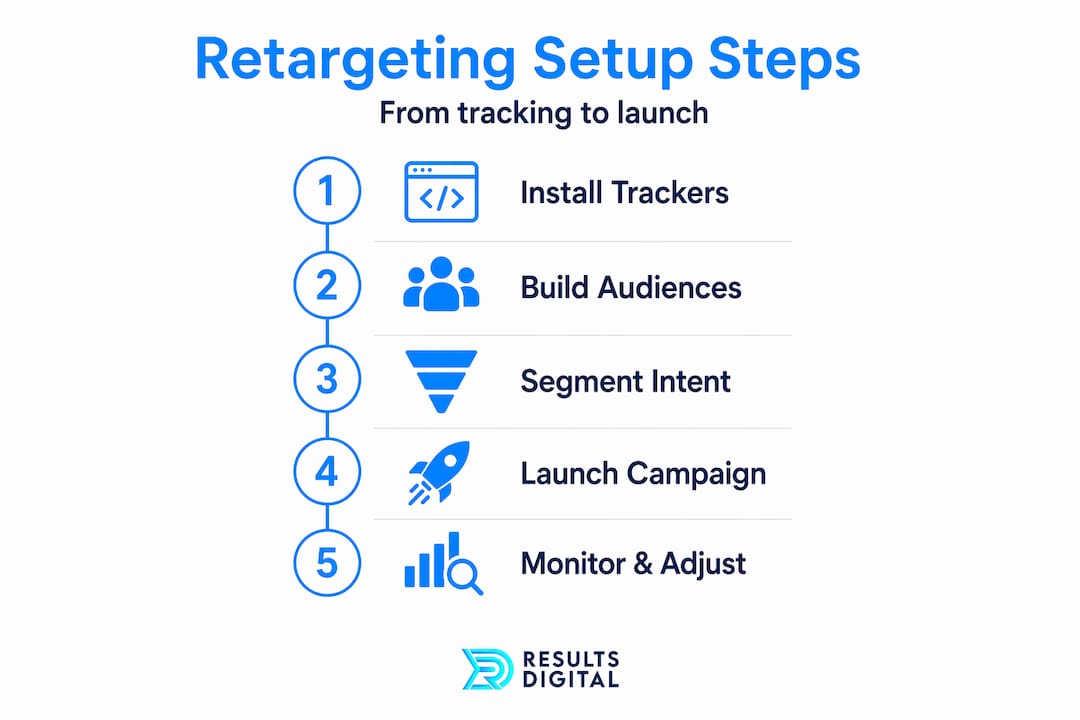
- Step-by-step retargeting campaign setup
- Common retargeting mistakes that drain your budget
- Tracking performance and knowing when to adjust
- My honest take on why most roofers leave retargeting money on the table
- Ready to run retargeting campaigns that actually book jobs?
- FAQ
Key takeaways
| Point | Details |
|---|---|
| Install tracking before anything else | Meta Pixel and Google Ads tag must be live and firing correctly before you build any audience. |
| Segment by intent, not just by visit | Pricing page visitors and service page visitors need different messages and different time windows. |
| Cap frequency to protect your brand | Limit retargeting impressions to 5-7 per week per user to avoid annoying potential customers. |
| Exclude converters immediately | 60% of ad accounts waste budget retargeting people who already submitted a quote. |
| Rotate creative consistently | Fresh ad creative paired with frequency caps is what sustains campaign performance over time. |
How to set up retargeting ads for roofers: the technical foundation
Before you touch a campaign, you need the right tracking infrastructure in place. Skipping this step is the single most common reason roofing retargeting campaigns underperform.
What you need to install first
You need two things live on your website before building any audience: the Meta Pixel for Facebook and Instagram retargeting, and the Google Ads tag for Google Display and YouTube retargeting. Both are installed through Google Tag Manager, which makes future updates far easier than manually editing code on every page.
Here’s where most contractors stop. They install the pixel, call it done, and wonder why their retargeting audience is tiny. The problem is iOS 14 privacy changes stripped out a significant chunk of browser-based tracking data. The fix is Meta’s Conversions API (CAPI), which tracks events server-side instead of relying solely on the browser. Accounts that switch from pixel-only to pixel plus CAPI see retargeting audience sizes grow 25 to 45% within 30 days. For a roofing company in a mid-sized market, that difference can mean the gap between a viable retargeting audience and one too small to activate.
Platform accounts you need
- Meta Business Manager with an active ad account and your pixel linked
- Google Ads account with conversion tracking and the remarketing tag confirmed active
- Google Tag Manager container installed on your website
| Tracking setup | Audience size | Data reliability |
|---|---|---|
| Pixel only | Baseline | Reduced post-iOS 14 |
| Pixel + Conversions API | 25-45% larger | Strong cross-device coverage |
Pro Tip: Check your Meta Events Manager and Google Tag Assistant daily during the first week after pixel installation. Confirm that key events like PageView, Lead, and Contact are firing correctly before launching any campaign.
Segmenting your retargeting audience by intent
One retargeting audience for all website visitors is one of the biggest budget mistakes you can make. A homeowner who spent four minutes reading your roof replacement service page is fundamentally different from someone who bounced off your homepage after 10 seconds. Showing them the same ad is a waste of money and a missed opportunity.
Effective retargeting ads for contractors require audience segments built around what visitors actually did on your site, not just that they visited. Here’s a practical framework for roofing companies:

| Audience tier | Behavior signal | Time window | Priority |
|---|---|---|---|
| Highest intent | Visited pricing or quote page, did not convert | 30 days | Highest |
| High intent | Visited service pages (roof replacement, storm damage) | 21 days | High |
| Medium intent | Visited multiple pages, spent 60+ seconds on site | 14 days | Medium |
| Low intent | Homepage bouncers, single page view | 7-14 days | Low |
| Exclusion | Submitted a form or called in the last 90 days | 90 days | Exclude |
The pricing page segment deserves your highest bid and your best creative. These are people who got close. They want help making a decision. Your ad should remove friction, not just remind them you exist. A testimonial from a neighbor who got a free inspection, paired with a direct call to action, works far better than a generic “We fix roofs” banner.
Pro Tip: Use exclusion stacking: exclude your highest-intent converters from your medium-intent segment, and exclude both from your low-intent segment. This prevents audience overlap and keeps your budget focused on the right people at each tier.
Creative alignment is the part most roofers ignore. A visitor who abandoned your quote form needs urgency and social proof. A blog reader who learned about storm damage needs education and a soft next step. Matching ad creative to visit intent is not optional if you want retargeting to pay off.
Step-by-step retargeting campaign setup
Now that your tracking is solid and your audiences are defined, here’s how to build the actual campaigns on both platforms.
Building audiences in Meta Ads Manager
- Go to Audiences in Meta Business Manager
- Click Create Audience and select Custom Audience
- Choose Website as the source
- Select your event (e.g., ViewContent, specific page URL) and set your time window
- Name each audience clearly: “Roofer Retarget: Quote Page 30D” for example
- Repeat for each segment tier, then create an exclusion audience for recent converters
Building audiences in Google Ads
- Navigate to Tools and then Audience Manager
- Click the plus icon and select Website visitors
- Define the page URL rules and membership duration
- Apply audiences to your Display or Performance Max campaigns at the Observation or Targeting level
Budgeting and frequency management
Retargeting should consume roughly 15 to 25% of your total ad budget. If you’re spending $3,000 a month on roofing ads, allocate $450 to $750 specifically to retargeting across both platforms. Weight the split based on where your prospecting spend lives. If you spend more on Google, put more retargeting dollars on Google Display and YouTube.
For frequency capping, Meta’s Sales campaign objective often ignores manual frequency cap fields. The workaround is to use tight audience segments and controlled daily budgets, which act as soft caps. For top-funnel retargeting, Meta recommends the Reach and Frequency buying type, which lets you set hard caps. Target 5 to 7 impressions per week per user for retargeting audiences. Going above that is where you start getting the “this company is everywhere and it’s creepy” reaction.
Creative rotation and ad types that work for roofing
- Before and after photo ads: Proof of work from a local neighborhood builds immediate trust
- Video testimonials: A 30-second clip from a satisfied homeowner outperforms stock photography every time
- Localized messaging: “Serving [City] homeowners since 2010” tells prospects you’re local and experienced
- Limited-time offers: Free inspections or financing promotions create urgency without being pushy
Rotate your creative every three to four weeks for smaller audiences (under 5,000 people) and every six to eight weeks for larger ones. Frequency caps work only when paired with fresh creative rotation. Stale ads degrade performance no matter how well you manage impressions.
Pro Tip: Set up a simple three-phase creative sequence: Week 1 to 2 runs social proof ads, Week 3 to 4 runs an offer or urgency ad, Week 5 to 6 runs a trust and credibility ad. Then rotate back. This keeps your brand feeling fresh without requiring new creative every week.
Common retargeting mistakes that drain your budget
Knowing what not to do saves as much money as knowing what to do. Here are the pitfalls that consistently hurt roofing retargeting campaigns:
- No exclusion lists: Without excluding recent leads and customers, you’re paying to annoy people who already said yes to you.
- One audience for everyone: Treating homepage bouncers the same as quote-page visitors wastes budget on the lowest-value segment.
- Generic creative for all segments: Showing a storm damage ad to someone who visited your gutters page is tone-deaf and reduces trust.
- Never rotating ads: Even a well-designed ad becomes invisible after a user sees it six times. Performance drops quietly before most people notice.
- Pixel-only tracking: This alone limits your audience by up to 45%, according to server-side tracking data.
- Ignoring frequency reports: If you’re not checking frequency weekly, you will overspend on a burned-out audience without realizing it.
Pro Tip: When your click-through rate drops below 0.5% on a retargeting audience and frequency is above 7 for the week, pause the creative immediately and swap in a fresh angle. Do not wait for the algorithm to self-correct.
You can review why roofing ads underperform for a deeper look at creative and audience misalignment issues that extend beyond retargeting.
Tracking performance and knowing when to adjust
Setting up the campaign is step one. Keeping it profitable is an ongoing job. Here are the metrics you need to monitor weekly:
- Frequency: Should stay between 3 and 7 per week per platform for active retargeting audiences
- Click-through rate (CTR): Below 0.5% signals creative fatigue or audience mismatch
- Conversion rate: Compare retargeting audiences against cold traffic to confirm they’re performing better
- Cost per lead: Should decrease over time as you refine exclusions and creative
Schedule a biweekly audit for smaller budgets and a weekly audit once you’re spending more than $1,000 per month on retargeting. When frequency is too high and audience size is too small to expand, it’s time to either pause retargeting temporarily or increase your prospecting budget to rebuild the audience pool.
For local roofing companies, the smartest setup combines Google and Meta retargeting so you’re following up across multiple platforms without doubling your budget. Google catches people in active search mode, while Meta reaches them while they’re scrolling social media. Together, they cover the full week of post-visit behavior.
Pro Tip: Cross-platform retargeting works best when your creative is consistent in message but adapted in format. The same testimonial that runs as a Facebook carousel can be reformatted as a YouTube 15-second pre-roll without rewriting anything.
My honest take on why most roofers leave retargeting money on the table
I’ve seen roofing companies with genuinely solid websites and strong service reputations lose jobs to competitors with weaker brands simply because they had no retargeting in place. In my experience working with contractors across multiple markets, the most common issue is not budget. It’s the belief that retargeting is too complicated or too technical to bother with.
The second issue is setup-and-forget thinking. Contractors install a pixel, build one audience, and run one ad for six months. That’s not a retargeting strategy. That’s a slow budget drain. What actually works is treating retargeting as a living system: segment it, cap it, rotate the creative, and audit it regularly.
What I’ve learned is that the roofers who win with retargeting are the ones who take segmentation seriously. They know their pricing-page visitors are different from their blog readers. They exclude converters the same day a lead comes in. And they refresh creative before performance drops, not after.
The technical side matters too. Combining the pixel with the Conversions API made a measurable difference in the campaigns I’ve overseen. More tracked events means bigger audiences, which means better performance and lower cost per lead. It’s not a nice-to-have in 2026. It’s the baseline.
— Results
Ready to run retargeting campaigns that actually book jobs?
Retargeting is one of the highest-ROI advertising strategies available to roofing and exterior contractors, but only when it’s set up correctly. The audience segmentation, frequency discipline, and creative rotation detailed in this guide work. The challenge is that managing them well takes time, expertise, and consistent attention.
Results Digital works exclusively with roofing and exterior contractors, handling campaign setup, audience building, creative development, and ongoing optimization so you’re not managing it alone. From digital marketing services built around lead generation to full-service Google and Facebook campaign management, every strategy is built to generate booked jobs, not just clicks. If you want to know exactly how your current ad setup compares and where retargeting fits into your lead generation workflow, reach out for a no-pressure audit. Results Digital works with one roofing company per market, so availability is limited.
FAQ
What is retargeting and how does it work for roofing companies?
Retargeting shows ads to people who already visited your roofing website but did not contact you. It uses tracking pixels and audience lists to follow up across Facebook, Instagram, Google Display, and YouTube.
How much should roofers spend on retargeting ads?
Retargeting should account for 15 to 25% of your total ad budget. For a $2,000 monthly ad spend, that means $300 to $500 allocated to retargeting across your active platforms.
How often should retargeting ads show to the same person?
Cap impressions at 5 to 7 per week per user. Above that threshold, most users report ad fatigue and the ads start generating negative brand associations instead of conversions.
Why is my retargeting audience too small to use?
A small retargeting audience usually means your pixel is firing incorrectly or you’re using browser-only tracking. Adding Meta’s Conversions API typically grows retargeting audiences by 25 to 45% within 30 days.
Should I exclude customers from my retargeting campaigns?
Yes, always. 60% of audited ad accounts waste budget showing retargeting ads to people who already converted. Exclude anyone who submitted a lead form for at least 90 days.
